Pest control software · Software review
GorillaDesk review: what a three-technician pest route actually looks like inside it
We built one scripted residential route — two customers, a quarterly service plan, a pesticide application, an invoice and a signed work order — and ran it end to end inside a GorillaDesk trial. Here is what the software did on its own, what it made us do by hand, and the four things we could not get past.
Affiliate disclosure: some links on this page are affiliate links. If you sign up through one we may earn a commission, at no extra cost to you. It does not change what we recommend or how we rank it. Details here.
The short version
GorillaDesk is shaped around recurring routes, which is the right shape for a residential pest control company, because your revenue comes from a contract that renews rather than from one-off jobs. Two things stood out. It writes a quarterly plan that actually stays put and shows future visits on the calendar without extra work, and it prints a pesticide application record that includes the product's EPA registration number — the kind of detail a state inspector asks for.
The thing we did not expect is that choosing a service quietly sets the schedule for you. Pick "Monthly Service" and the repeat fields fill themselves in. That is either the best design decision in the product or the most expensive one, depending on whether you notice it working.
Four limits got in our way: the trial stopped us emailing customers after the first message, check-in and check-out times go nowhere after you save them, a signed work order cannot be corrected, and the $49 plan will not auto-charge a customer's card — that starts at $99.
At a glance
| Best for | 1–10 person pest control, lawn care or similar route-based companies that sell recurring service contracts |
| Not for | Companies that need auto-charging or multi-unit property management at the lowest price, and anyone who wants to evaluate customer emailing on a free trial |
| Price we verified | $49/month Basic · $99/month Pro · $149/month Growth — checked 8 October 2026 on the vendor's own pricing page |
| Pricing model | Per route, not per user. Three technicians each running their own route is three routes. |
| Plan we tested | Basic (free trial). Pro and Growth were not tested. |
| Scenario | 3-technician residential company: one quarterly house account, one monthly 24-unit building, one pesticide application, one invoice, one signed work order |
| Strongest feature | The pesticide application log, and the fact that it prints on the customer's work order with the EPA number |
| Weakest area | Record-keeping around the job — no hours, no technician attribution on the chemical record, no way to correct a signature |
What we tested, and what we did not
All of this is one scripted scenario, run the same way we run every tool on this site — a three-technician residential company on quarterly contracts, with a house account and a 24-unit apartment building, a $189 monthly service, a pesticide application logged with dilution and location, a work order photo, and a client signature. The full method is here, including the list of things we cannot test.
Two limits on this review, stated up front. We tested a trial account on the Basic tier, so anything gated behind Pro or Growth is unverified. And we tested from outside the United States, so we can tell you what the software does, not what it feels like to run a real crew on it for a season.
Every price on this page was read off the vendor's own pricing page on 8 October 2026. We do not quote aggregator prices.
GorillaDesk pricing: what $49 actually buys
These are the published tiers from GorillaDesk's own pricing page, read on 8 October 2026.
| Tier | Price | What it adds |
|---|---|---|
| Basic | $49/month or $539/year | Estimates, invoices, work orders, recurring jobs, scheduling, materials tracking, Square/Stripe integration, 20 reports |
| Pro | $99/month | Everything in Basic plus automatic subscription charging, the customer portal, online booking, review requests, e-signature, multi-unit property management |
| Growth | $149/month or $1,639/year | Everything plus map-based estimating, dynamic quote packages, sales pipeline, custom fields, multiple branches |
Two gates matter more than the headline number if you run pest routes.
Automatic card charging is a Pro feature. On Basic you can set a recurring invoice frequency — the software knows when to bill — but it will not pull the money. For a company whose whole revenue model is a quarterly contract on file, that difference in cash flow is bigger than the $50 gap in the plan price. A three-route shop that needs auto-charge is budgeting $99 a month, not $49.
Multi-unit buildings are also Pro. Our second test customer was a 24-unit apartment building, and that is the tier where multi-unit property management lives.
One correction to our own first impression: chemical tracking appears in the Add-ons panel of the interface, which made us assume it was a paid extra. It is not — it is included in the $49 tier. We checked the pricing page before writing this.
The billing model is per route, not per seat: each technician running their own route counts as one route. That is friendlier than per-user pricing for a company that hires a second tech, and less friendly if you are a solo operator with a part-time helper.
Recurring routes: the reason to buy this
If you only read one section, read this one, because it is where GorillaDesk separates itself from general-purpose field service tools.
Any interval, not just weekly and monthly
A recurring job starts at Off, Daily, Weekly, Monthly or Yearly. Pick Monthly and an extra row appears: Every [ 3 ] month. Set the 3 and you have a quarterly contract. The same field does bi-monthly, every 21 days, whatever your service cycle actually is. Below it you get an end condition — never, after a number of visits, or on a date — and an "except" rule for skipping an occurrence on a condition, which is how you handle a customer who pauses over winter.
It tells you what you just built, in English
The best small detail in the product: a summary line that rewrites your settings as a sentence. Set the interval to 3 months on the 12th and it reads "Every 3 months on the 12th." Change the date to the 8th and it updates to "on the 8th". This matters because the frequency controls are the easiest thing in the product to get wrong, and a wrong frequency is invisible — you find out three months later, when a customer either gets an unexpected visit or none at all.
One job puts a year and a half on the calendar
We created a single quarterly job. Then we browsed the calendar forward: 12 January 2027, 12 April 2027, 12 October 2027, 12 January 2028 — all there, same service, same 9:00 to 10:00 a.m. window. We stopped counting after six visits, so we can say it projects at least 15 months out.
Worth knowing how it works underneath, because it changes what you are looking at. Those future entries are projections from the recurrence rule, not job records. The tool creates one live job at a time. When we marked a visit complete, it created the next one on the spot — the record for the following visit carries a creation timestamp of the minute we clicked Complete, not the day the contract started. The good part: you never have a drawer full of empty jobs. The catch: if you want to know how full next April looks, the calendar is an estimate, and the real answer builds itself as you go.
The service library already knows pest control
The service list shipped with the account includes Quarterly Pest Control, Bi-Monthly Service, Every 21 Days, Bed Bug Heat Treatment, Flea & Tick Control and Call Back Service. The frequency is baked into the name, and choosing one sets the repeat fields for you — we selected "Monthly Service" in a new job and looked back to find the repeat had switched itself to Monthly without us touching it.
That is genuinely helpful for someone who is not sure whether a customer should be on 30 or 45 days. It is also the kind of help that fails quietly. Choose the wrong service out of that list and the schedule follows the name, and nothing in the interface warns you that the plan you just built does not match the price you quoted.
The friction we hit: the job form is service-first. Until you pick a service, the date, time, technician and repeat fields stay greyed out and unclickable. We spent a few minutes clicking a disabled button before working out why. Once you know the rule it is a sensible check — you cannot create an empty job with a date and no service — but nothing on the form tells you that is the rule.
The pesticide log is the best thing here
Pest control is a regulated trade, and the record that matters is what went in the ground, how much, where, and which registered product it was. Here is what the work order printed after we logged one application.
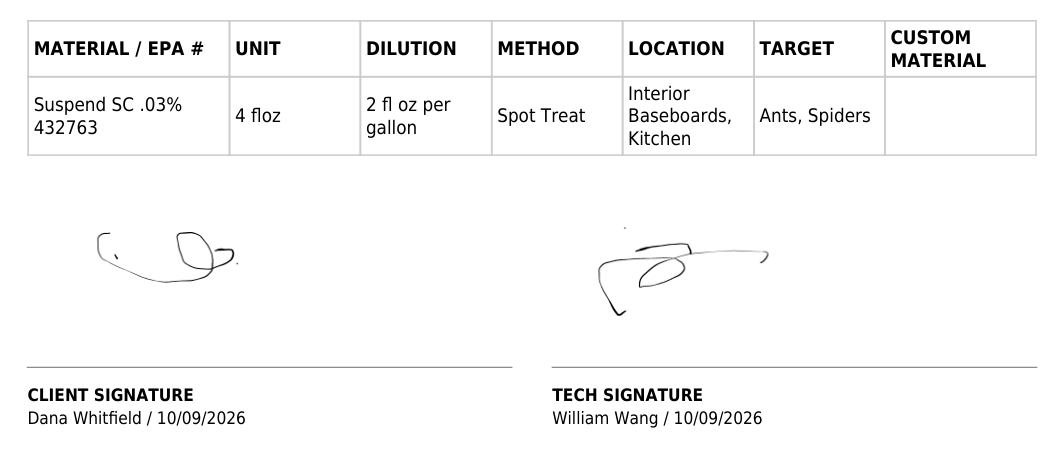
Four things make this more than a text box:
- The product list is real. The Material dropdown ships with dozens of products pest companies actually use — Suspend SC, Termidor SC, Cy-Kick Aerosol, Delta Dust, Maxforce Gel, Advance Disk bait, Cyonara Granules, Final Blox, Wasp Freeze — each with the active-ingredient strength in the name. You are selecting a registered product, not typing one.
- The units cover dilution and counting. Fluid ounces, gallons, pounds, but also
floz/galandml/galfor mix ratios, andstations,trapsandstripsfor rodent work. - The application method has a "no pesticide" option. Aerosol, dust, gel bait, granules, spot treat — and also Rodent Station, Rodent Trap and Inspection, so a monitoring visit can be documented as a monitoring visit.
- The location and pest lists are specific. Not "interior" but Interior Baseboards, Wall Voids, Crawl Space, Attic Space, Dumpster Area, Kitchen. Not "rodents" but Roof Rats and Field Mice as separate targets. Both lists take multiple selections, so one visit can cover three rooms and two pests.
Two gaps worth knowing about before you plan around this.
1. The record does not say who applied it, or when. The materials entry carries no technician name and no timestamp. Neither does the exported work order, and it does not appear in the job's activity log either. Oddly, the photo we attached to the same work order does record that — the image preview says "Added on Oct 09, 2026 by William Wang". So the software is capable of attributing an upload to a person; it just does not do it for the chemical record, which is the document a regulator actually asks about.
2. The EPA number only exists on the printed document. On screen, the materials tab shows the product name. The registration number appears when the work order is exported as a PDF. That is fine for the customer and the file cabinet — the printed copy is what gets handed over — but if you are checking a record on your phone in the office, the number is not there.
Invoicing, and how a payment gets recorded
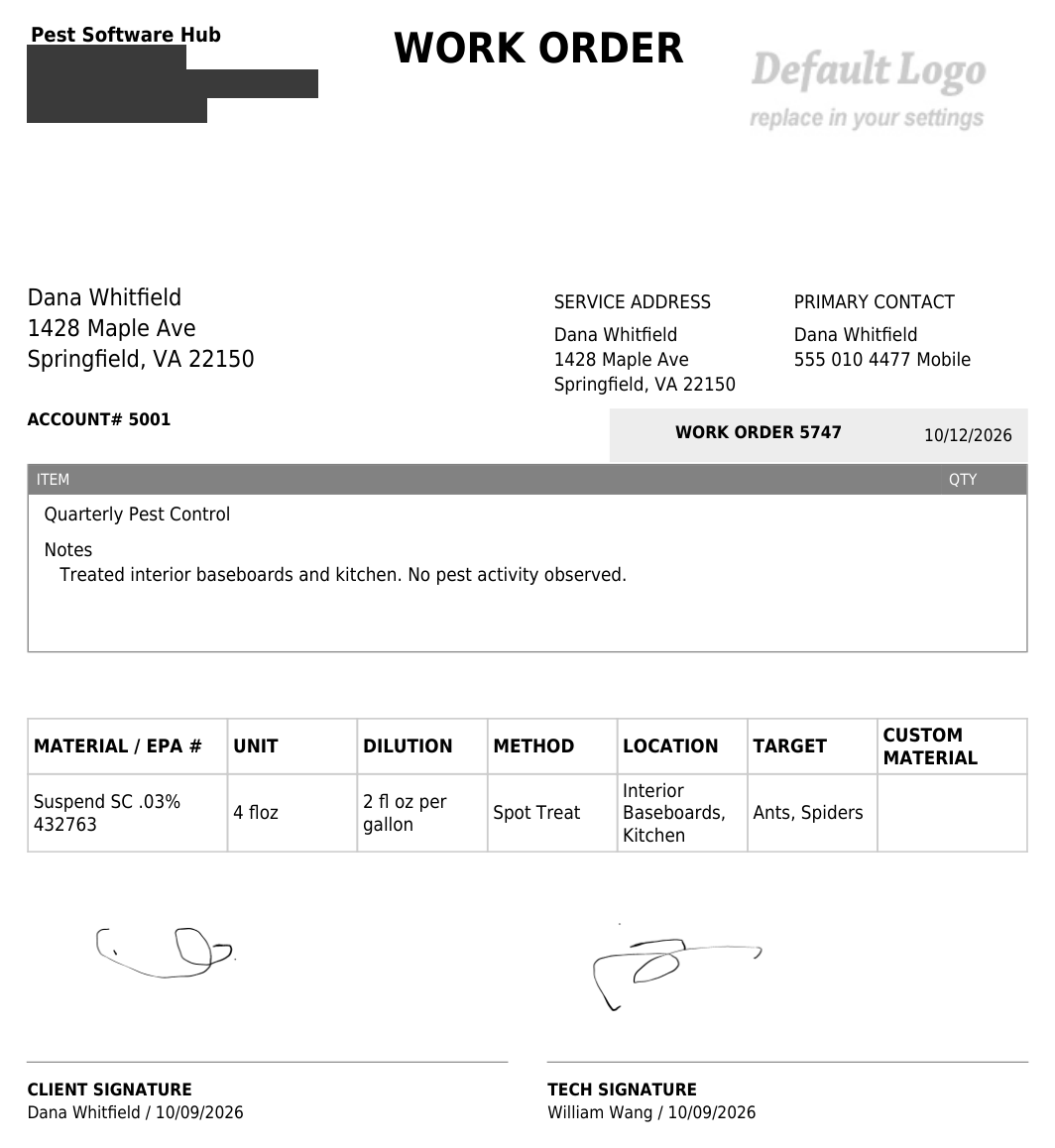
A few things we found by doing it rather than reading about it.
The invoice builds itself, price included
We created a recurring job for a monthly service and found the system had already drafted an invoice for it: line item "Monthly Service", description "General maintenance monthly.", $35.00. We never typed $35 — that is the preset price attached to that service in the demo data. The work order also set its invoice frequency to "Monthly with each job".
For a new user this is a trap with a friendly face. You finish scheduling, feel productive, and there is a draft invoice sitting there with a number the software picked. If you send it without checking, you just billed a customer for the wrong amount. We changed ours to $189 and the totals recalculated on their own.
Recording a payment updates the invoice by itself
We logged a cash payment against the sent invoice. The invoice flipped from Sent to Paid without us touching its status, and the outstanding balance went to zero. Small thing, real consequence: if that did not happen, you would be phoning customers who already paid you.
Only two offline payment methods
The payment panel offers Cash and Check. That is it — no Zelle, no Venmo, no bank transfer, no "other". If a customer pays you by Zelle, which is common enough among small US operators, you have to file it as cash or check, and your records stop matching your bank statement. Card payments run through the Square or Stripe integration instead, which is a different screen.
Numbers you would not expect to disagree
While the invoice was a draft, "Amount Due" showed $189.00 and "Balance Due" showed $0.00. That is the system's way of saying a draft is not yet owed. It is defensible, and it is also the kind of thing that makes a new user think the software has lost a number.
What your customer actually receives
We pointed the customer email at an address we control, so we could read what a real customer would get. Two messages went out of this test: an invoice before the visit and a work order after it.
The good parts. Both emails are branded with your company name and nothing else — no "sent via GorillaDesk" footer, no vendor branding in the subject line. The invoice email addresses the customer by first name and attaches the invoice as a PDF. The work order email does the same with the work order. For a small company, that matters: the email looks like it came from you.
The part that will make you wince. Both templates contain the sentence "You can make a secure online payment here:" followed by a link. Our account had no payment processor connected, so the link was empty — the sentence just trails off into nothing, in an email with your name at the top. Nothing in the setup prompts you to remove that line. If you do not plan to take online payments, fix that template before your first invoice goes out.
And the part that is on you. Everything in your company profile gets printed or sent verbatim. Our test account's phone number, address, and the personal email we typed in, all appeared on customer-facing documents and in the email signature. That is not a bug — it is what a business profile is for — but there is no sanity check on it either, so a placeholder you forgot to change does not get caught.
The watermark. Until you upload a logo, every invoice and work order carries a grey placeholder in the corner reading "Default Logo — replace in your settings", and that includes the PDF your customer receives. We saw it on the invoice, on the work order, and on the exported file.
Four things that will annoy you
- The trial blocks customer emails after the first one. We sent one invoice email, then tried to send a work order and got "You've hit your free trial email limit." The trial is 14 days and does not ask for a card, which is generous. But if you want to evaluate what your customers see, or test a billing workflow that involves reminders, you cannot do it on the trial.
- Check-in and check-out times are editable and go nowhere. A technician can clock in and out on a job, and both timestamps can be set to any time manually — useful when someone forgets, useless as evidence of when they arrived. Worse, we could not find those times anywhere downstream: not in the activity log, not in the exported PDF, and there is no hours or payroll report among the 16 reports. They appear to be a display, not a record. If you want to know how many hours a tech worked this month, this will not tell you.
- You can sign a work order but you cannot fix it. The signature dialog covers both the client and the technician, with a draw option and a typed option, and stamps the printed name and the signing date underneath. Save it, though, and the signature area becomes a plain image. Clicking it does nothing, and the buttons that opened the dialog are gone. There is no visible way to re-sign or clear it if someone signs in the wrong place.
- Cancelling a visit and ending a contract live in the same dropdown. The job status list reads Confirmed, Unconfirmed, Canceled, Terminate Service, Reschedule, Completed. The color coding helps — Canceled is pink, Terminate Service is dark red — but "skip this visit" and "end this recurring contract" are two very different actions sitting one row apart. Selecting Completed does at least ask you to confirm first.
Who should buy this
Buy it if you run residential pest or lawn routes on recurring contracts, you have between one and about ten technicians, and the thing you most need software to do is keep the service schedule straight without you rebuilding it every month. The pesticide documentation is a genuine bonus at this price, and it is included in the cheapest tier.
Budget for Pro rather than Basic if you want the software to charge your customers' cards automatically, or you service multi-unit buildings. For most residential pest companies on recurring contracts, that is the real entry price, and it is worth planning for it rather than discovering it at checkout.
Look elsewhere if your business depends on tracked labour hours, fine-grained technician accountability, or paying customers through anything other than cards, cash and checks. Those are the areas where this product is thinnest, and they are not things a settings change can fix.
Consider a general-purpose tool instead if pest control is only part of what you do. GorillaDesk is narrow on purpose — the trade-specific service library and chemical logging are the payoff for that narrowness, and if you are splitting your week between pest work and handyman work, those are worth less to you.
Frequently asked questions
Does GorillaDesk track chemical and pesticide usage?
Yes — in the $49 tier, not as an add-on. Every work order has a Materials tab where you log the product, the amount, the dilution, the application method, the location and the target pest, and all of it prints on the customer's work order.
Does the pesticide record show the EPA registration number?
Yes, on the exported document. The product list attaches the registration number to the product, and it prints next to the product name on the work order PDF. On screen you only see the product name.
Does it record which technician applied the pesticide?
Not that we could find. There is no technician field on the materials entry, no timestamp on it, and nothing on the exported work order. Photos attached to the same job do record who added them, so this looks like a decision rather than a limitation — but the chemical record is the document that matters most, and it is the one missing the attribution.
Can it handle quarterly-only pest routes?
Yes, and it is the product's strongest area. Recurring jobs take a custom interval, so "every 3 months" is a setting rather than a workaround, and the form confirms it back to you in plain English before you save.
How much does it really cost for a three-technician company?
Three routes on Basic is $147 a month. Add auto-charging and you are on Pro at $297 a month. That is the version of the price most residential pest companies should be comparing against alternatives, not the $49 figure on the pricing page.
Is the free trial enough to evaluate it?
For scheduling, invoicing, quotes and the pesticide log, yes. For anything that involves emailing customers, no — we hit the trial's email cap after our first customer email.
Can we use it outside the United States?
We signed up and ran the whole test from outside the US, with US currency and a US time zone, and it worked. One caveat for non-US operators: the signup form's phone field is built for 10-digit US numbers and does not accept a longer international number, so expect to work around it and fix the number in your profile afterwards.
Sources, and how to cite this page
Pricing taken from the vendor's own pricing page on 8 October 2026. Feature behavior observed in a free trial account (Basic tier) on 8–9 October 2026. Test data is fictional. Screenshots are from our own test account, with identifying details removed. We have not been paid by the vendor, and this review was not shown to the vendor before publication.
Cite this page: Wang, William. "GorillaDesk review: what a three-technician pest route actually looks like inside it." Pest Software Hub, 9 October 2026. https://pestsoftwarehub.com/gorilladesk-review
Corrections: if a price or a feature here does not match what you see in your own account, tell us and we will check it and publish the fix with the date.
Related reading
- How we test, and what we can't — the method behind this review, including the things we could not verify
- Pest Software Hub home — what is on the bench and what is already finished