Pest control software · Pricing breakdown
QuoteIQ pricing: five plans, an extra-seat fee, and a trial that wants a card
QuoteIQ sells five monthly plans: $29.99 for one user, $99.99 for two, $199.99 for four, $299.99 for ten and $699.99 for twenty. Every plan also carries a $25 per additional user, per month charge, which is the number that decides what the cheapest plan really costs — three technicians on Essentials is $79.99, not $29.99. And the 14-day trial requires a credit or debit card to start, in QuoteIQ's own words, which is the one wall that stopped us testing the software at all.
Affiliate disclosure: this page contains an affiliate link for QuoteIQ. If you sign up through it we may earn a commission, at no extra cost to you. That is the only reason this page exists as a pricing breakdown rather than a review: we could not finish testing the product, so we are not going to write opinions about it. Everything below is a number from QuoteIQ's own pages or from screens inside its free workspace. Full disclosure here.
The short version
The price list is simple and the numbers are public, which is more than three of its competitors manage. What is easy to miss is that the per-plan user allowance is small — one, two, four, ten, twenty — and every extra seat costs $25 a month regardless of which plan you are on. For a small pest company that changes the answer. The $29.99 plan is not a three-technician plan until you add $50 of seats to it, and at that point you are comparing $79.99 on the cheapest tier against $199.99 on Pro with four seats and 20,000 IQ Credits included.
The second thing to know before you click anything: the trial is not a look-around. QuoteIQ states that a credit or debit card is required to start it. You can register without a card, and you will land in a free workspace, but the parts of the product our test route depends on ask you to upgrade. If you are not ready to put a card on file, this product is not one you can evaluate quietly first.
So this page does two jobs and neither of them is a recommendation. It lays out the prices as we read them on October 12, 2026, and it tells you plainly why there is no QuoteIQ review on this site. That policy applies to every product we cover.
At a glance
| Essentials | $29.99/mo — 1 user · no monthly IQ Credits · 25 GB storage |
| Beginner | $99.99/mo — 2 users · 10,000 IQ Credits/mo · 125 GB |
| Pro | $199.99/mo — 4 users · 20,000 IQ Credits/mo · 250 GB |
| Elite | $299.99/mo — 10 users · 40,000 IQ Credits/mo · 500 GB |
| Max | $699.99/mo — 20 users · 80,000 IQ Credits/mo · 1 TB |
| Extra users | $25 per additional user, per month — stated on every plan, not just the top ones |
| Yearly billing | Two months free against monthly |
| Free trial | 14 days · credit or debit card required to start |
| Included on every plan | Estimates · Invoices · Pricing and line items · Payments · Documents and signatures · Scheduling and calendar · Jobs |
| Max only | Dedicated account manager · Shared IQ Credits for multi-company · four additional businesses included |
| What we could not test | Any of it. Our trial would have needed a card, and we do not add payment details to trial accounts. |
The five plans, as they stood on October 12, 2026
We read these twice on the same day: from QuoteIQ's own pricing page, and from the plan screen inside the product, which is the version below. They agree.
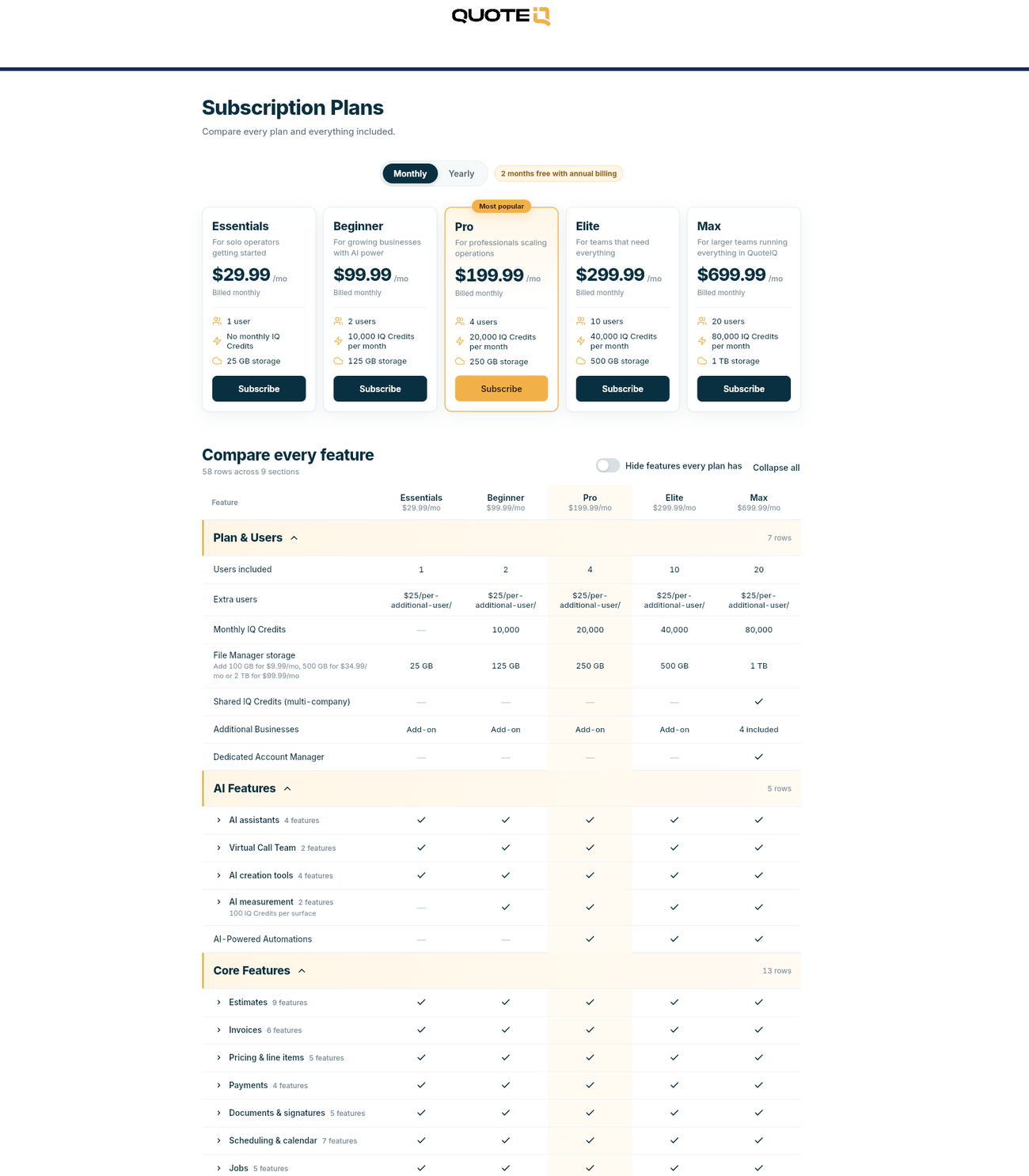
Two structural things worth pulling out of that screen. The comparison table below the cards is 58 rows across nine sections, and the section called Core Features — estimates, invoices, pricing and line items, payments, documents and signatures, scheduling, jobs — is ticked on every plan including the $29.99 one. The differentiation starts in the AI Features section, and it starts early: AI-Powered Automations is Pro and above, and the Essentials plan carries no monthly IQ Credits at all, which is what the AI tools spend.
The number that changes the cheapest plan
Extra users are billed at $25 per additional user, per month. It is printed on the pricing page and in the product's own FAQ, and it applies on every plan rather than only the expensive ones. That single line turns the headline price into a different calculation for anyone with a crew.
| If you need | Essentials $29.99 · 1 user | Beginner $99.99 · 2 users | Pro $199.99 · 4 users |
|---|---|---|---|
| 1 user | $29.99 | $99.99 | $199.99 |
| 2 users | $54.99 | $99.99 | $199.99 |
| 3 users | $79.99 | $124.99 | $199.99 |
| 5 users | $129.99 | $174.99 | $224.99 |
Monthly, using each plan's own allowance and $25 for every seat above it. Three technicians can be put on this software for $79.99 a month, which is $120 less than the plan that includes four seats out of the box. That is not a trick and it is not a loophole — it is what the published price list says, and it is the kind of thing a buyer only notices if somebody says it out loud.
What the extra $120 a month buys is not nothing, and we would rather describe it than let the table decide for you. Beginner adds 10,000 IQ Credits a month and five times the file storage. Pro adds 20,000 credits, the AI-Powered Automations tier, job costing and QuickBooks. If you plan to use the AI estimating and scheduling tools, the credits are the thing you are actually buying, and they are the reason the cheapest route may not hold. If you want estimates, invoices, scheduling and online payments with no AI layer, the cheap route is on the price list.
What else sits on the bill
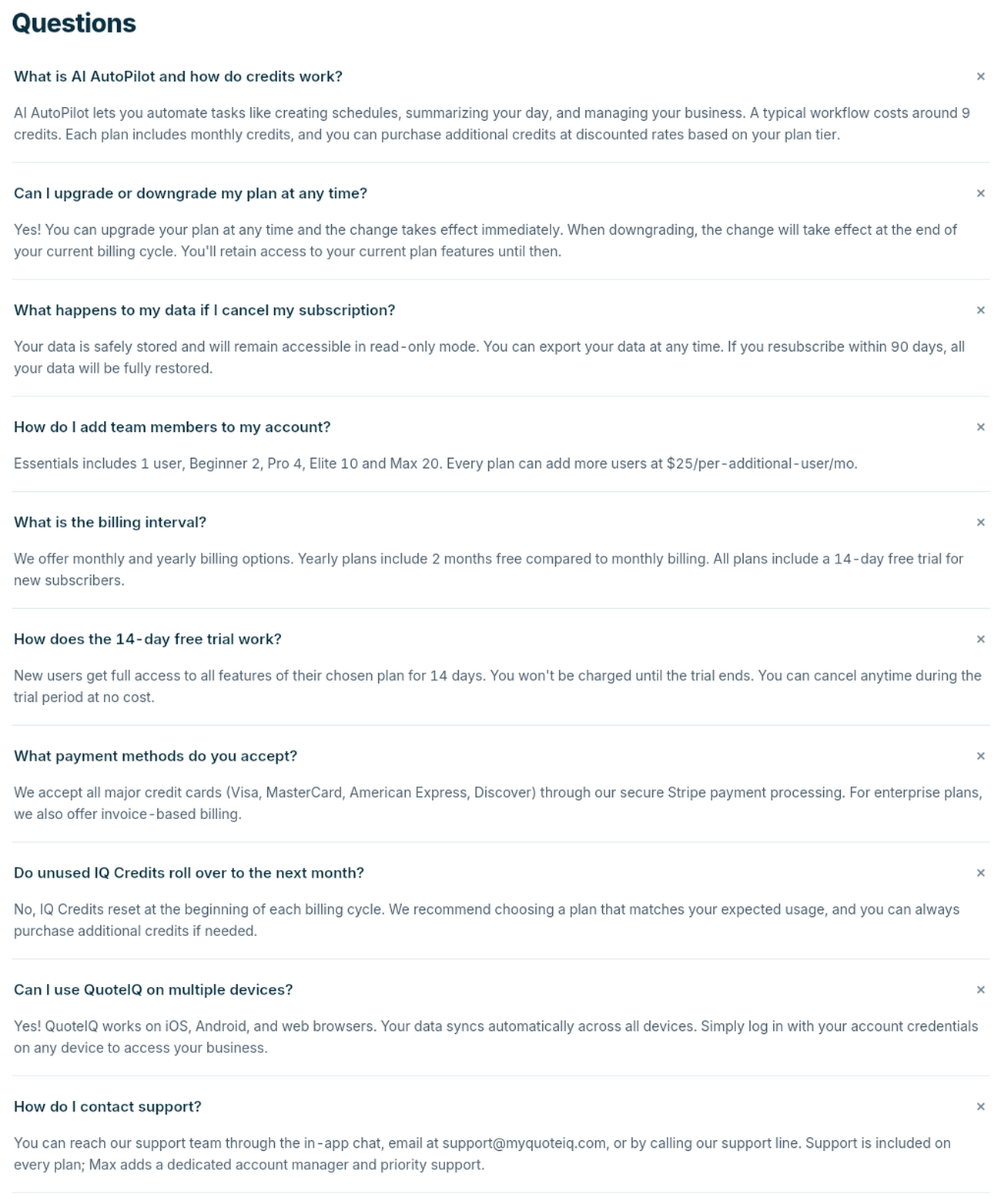
- IQ Credits, if you run out. They reset at the beginning of each billing cycle and do not roll over, by their own FAQ. QuoteIQ describes a typical AI AutoPilot workflow as costing around nine credits, and says you can buy additional credits at discounted rates based on your plan.
- File storage, if you outgrow it. The plans carry 25 GB to 1 TB, and their own table prices extra storage at $9.99 a month for 100 GB, $34.99 for 500 GB or $99.99 for 2 TB.
- Payment processing. Their comparison table has a row for processing fees, which is where a card-taking business should look before it decides a subscription is cheap. We could not read the rates from the free workspace, so we are not quoting a number.
- Additional businesses. Sold as an add-on on every plan except Max, which includes four.
The trial, in their own words
This is the part we would want a reader to read before anything else on the page, so here it is without paraphrase. From QuoteIQ's live pricing page on October 12, 2026: "Every plan has a 14-day free trial, and a credit or debit card is required to start."
Their product FAQ softens it in the expected way — "You won't be charged until the trial ends. You can cancel anytime during the trial period at no cost." — and the same FAQ lists the accepted payment methods for a subscription as major credit cards through Stripe, with invoice-based billing for enterprise plans. There is no PayPal option in that list.
What the free workspace actually is
You can register without a card. What you get is a workspace with no plan attached, and the first thing it does is ask you to pick one. Our notes from that session are blunt: the pages our scripted route depends on answered with Locked — Upgrade your plan to access…, and we completed none of the six steps we run in every product on this site — no customer, no recurring plan, no quote, no invoice, no completed visit, no owner report.
That is the whole reason this page has no opinion in it. A review written from that workspace would be a review of the lock screen, and we are not going to dress it up. What it cost us is real, though: QuoteIQ pays the highest commission rate of any program we looked at, and we still are not publishing a review of it. The editorial standards page explains the rule.
If you are ready to put a card on file: QuoteIQ's signup is here — that is an affiliate link, and we earn a commission if you register through it. If you would rather read the plans first without any tracking, their own pricing page is here. Both go to the same company; only one of them pays us.
Two readings three days apart that do not agree
We are publishing this part because leaving it out would make the rest of the page look tidier than the record is. Our own notes from October 9, 2026 record QuoteIQ's website quoting $74.99 and $149.99 for the Beginner and Pro tiers, and stating that there were no per-user fees. When we re-read the same page on 12 October, it showed $99.99 and $199.99 and stated the $25 per-additional-user charge.
Two readings three days apart that disagree is exactly the kind of thing we would normally show you a screenshot of. We do not have one for the earlier date — only our written note — so we cannot tell you whether the page changed or whether we misread it the first time. Both are possible, and one of them is our error. What we can tell you is what the page says today, which is what this article is built on, and that the plan screen inside the product agrees with it. If you have a capture of that page from early October, we would like to see it.
Frequently asked questions
How much does QuoteIQ cost per month?
Five plans, monthly: $29.99, $99.99, $199.99, $299.99 and $699.99, for one, two, four, ten and twenty users respectively. Yearly billing saves two months against monthly. Read from their own pricing page and their in-product plan screen on October 12, 2026.
Does QuoteIQ charge per user?
Yes. Each plan includes one, two, four, ten or twenty users, and every plan charges $25 per additional user per month. That is why the cheapest plan is only the cheapest plan for a one-person company — three users on Essentials is $79.99, not $29.99.
Is the free trial really card-free?
No. Their pricing page says a credit or debit card is required to start the 14-day trial. Their FAQ says you will not be charged until it ends. We do not add payment details to trial accounts, so we did not start one.
Can I use it without the AI features?
The core tools — estimates, invoices, pricing, payments, documents, scheduling, jobs — are on every plan including the cheapest. Essentials carries no monthly IQ Credits, so the AI tools have nothing to spend. If you do not want the AI layer, the cheap plan is not a crippled product; if you do, the credits are the reason to look further up the list.
What happens to my data if I cancel?
Their FAQ says your data stays accessible in read-only mode and can be exported at any time, and that resubscribing within 90 days restores it fully. Unused IQ Credits do not roll over. We have not subscribed, so this is their stated policy rather than our experience.
Why is there no QuoteIQ review on this site?
Because we could not test it. The trial needs a card, and the free workspace does not let you run a route — the pages our test depends on ask you to upgrade. That is a policy decision of ours, not a criticism of theirs, and it applies to every product we cover. The coverage list is here.
Sources, and how to cite this page
Plan prices, user allowances, the $25 per-additional-user charge, IQ Credit allowances, storage allowances, extra-storage pricing, billing intervals, trial terms, accepted payment methods, cancellation policy and support channels were read from QuoteIQ's own pricing page and from screens inside a QuoteIQ free workspace on October 12, 2026. The in-product plan screen and the product questions panel were captured on October 9, 2026 and re-read before publication. We have never subscribed, never paid QuoteIQ anything and never added a payment method to a trial account, so every figure here is a published price list rather than an invoice. We are a QuoteIQ affiliate and this page carries an affiliate link, which is disclosed at the top. QuoteIQ has not seen this page and has not paid us.
Cite this page: Wang, William. "QuoteIQ pricing: five plans, an extra-seat fee, and a trial that wants a card." Pest Software Hub, October 12, 2026. https://pestsoftwarehub.com/quoteiq-pricing
Corrections: if a price here does not match what you see at checkout, or if you have a capture of QuoteIQ's pricing page from early October 2026, tell us and we will publish what we find with the date.
Related reading
- The free workspace, and where it stops — why it is not a substitute for a plan
- What the rest of the market charges — and which vendors publish nothing at all
- Cost calculator — what one extra seat does to the number
- How to choose pest control software — including how to run a trial without handing over a card
- Why this page is not a review — our testing log, and the trials that stopped early