Pest control software · Chemical record
GorillaDesk pesticide records: every field, tested on a real job
Yes, GorillaDesk keeps a pesticide application record and prints it on the customer's work order PDF. In our test visit it produced a seven-column table — product, EPA registration number, units, dilution, method, treated locations and target pests — with a client signature and a technician signature underneath. Two things it does not show: the time of the application, and who applied it, on the record row itself.
Affiliate disclosure: some links on this page are affiliate links. If you sign up through one we may earn a commission, at no extra cost to you. It does not change what we recommend or how we rank it. Details here.
The short version
Most field service software has nowhere to record what you sprayed. That is the gap GorillaDesk fills, and it fills it on the cheapest plan rather than as an add-on. The form you fill on site has seven fields, five of which are pickers rather than free text, and the whole thing prints on the customer's work order with the product's EPA registration number in the same cell as the product name.
The parts worth thinking about before you buy are the gaps rather than the features. The record row carries no time and no technician name, so if somebody asks "who treated this house on the 12th, and at what time" the answer is not on the page — it is in the signature block, and only if the job was signed. We also found no field anywhere for an applicator licence or certificate number, which is the thing we would have expected to see next to the EPA number.
None of that makes it a bad record. It makes it a specific record, and whether it is enough depends on a form we have not read. Read the checklist further down, compare it against what your state's lead agency actually publishes, and decide from that.
At a glance
| Where you log it | The Materials tab on the job, alongside Job Details, Scheduling and Work Order |
| Fields | Seven: Material / EPA # · Units · Dilution · Method · Custom Material · Locations · Targets Pests |
| Prints on | The customer's work order PDF, as a table under the service lines. Not on the invoice. |
| EPA registration number | Yes — printed inside the product cell, not in a column of its own |
| Multiple products, sites, pests | Yes — Locations and Targets Pests both take more than one value |
| Time of application on the record | No — we could not find one on screen or in the export |
| Technician name on the record | No — only in the signature block, and only once the job is signed |
| Applicator licence number | We found no field for it |
| Plan we tested | Basic, $49 a month, free trial. The record is included, not gated. |
| Verify prices on | GorillaDesk's own pricing page — we read it on 8 October 2026 |
What we tested
One scripted visit, run the same way we run every tool on this site. A three-technician residential company, quarterly contracts, customer Dana Whitfield at a house on 1428 Maple Ave. We created the customer, built the quarterly plan, dispatched the job, logged the application, exported the work order and opened the PDF.
The application we recorded was a real one from our test product list — Suspend SC .03%, EPA registration number 432763, four fluid ounces, diluted at two fluid ounces per gallon, spot treated along interior baseboards and in the kitchen, targeting ants and spiders. We picked every value from GorillaDesk's own lists; the only thing we typed by hand was the dilution ratio.
Two limits up front. We ran this on a Basic trial, so anything held back for Pro or Growth is unverified. And we are not in the trade and not in the United States — we can tell you what the software produces, not what your inspector will accept. The full method, including what we cannot test, is here.
Where the record lives inside GorillaDesk
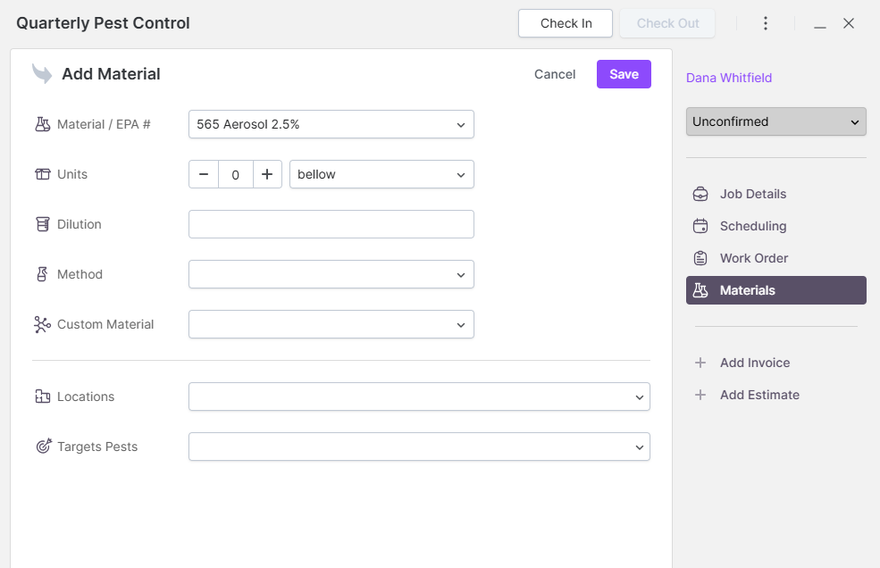
Open a job and you get a right-hand rail with four entries: Job Details, Scheduling, Work Order and Materials. The Materials tab is where the chemical record goes, and it sits above the Add Invoice and Add Estimate links rather than inside a separate compliance module. That matters practically: your technician does not have to remember to open a second screen after a job, because logging the product is one of the things that job's screen already offers.
The seven fields, one at a time
This is the whole form. There is no second page to it.
| Field | What it is | What we logged |
|---|---|---|
| Material / EPA # | A dropdown of your products. The label puts the EPA number in the field name itself. | Suspend SC .03% |
| Units | A number box plus a unit picker. The picker we saw included "bellow". | 4 floz |
| Dilution | Free text. This is the one field with no list behind it. | 2 fl oz per gallon |
| Method | A picker for how it was applied. | Spot Treat |
| Custom Material | A picker for products that are not in your list. | left blank |
| Locations | A picker that accepts more than one value. | Interior Baseboards, Kitchen |
| Targets Pests | A picker that accepts more than one value. | Ants, Spiders |
The EPA number travels with the product rather than with the visit. The product list attaches the registration number to the product, the picker in the app is labelled Material / EPA #, and the number prints under the product name on the export. Practically, that means it is entered once when the product is set up and never retyped on a Friday afternoon — which is the right way round, because the failure you are trying to avoid is a number copied from memory.
The one thing we would change: Dilution is free text. Everything else on the form is constrained to a list, so it is the one field where two technicians can record the same mix in two different ways. If you are going to have a house rule about data entry, make it about this box.
What actually prints on the customer's work order
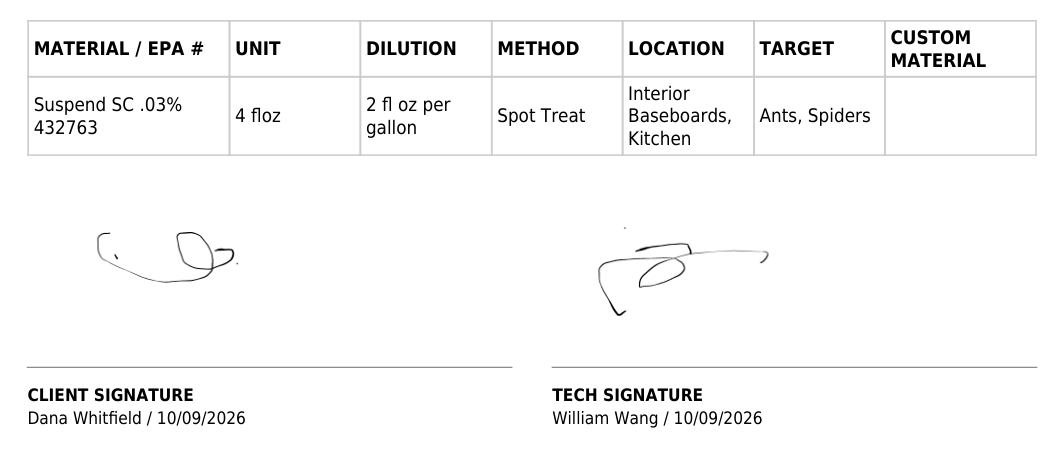
Export the work order and the application appears as a table between the service lines and the signature blocks, with the same columns for every record:
| MATERIAL / EPA # | UNIT | DILUTION | METHOD | LOCATION | TARGET | CUSTOM MATERIAL |
|---|---|---|---|---|---|---|
| Suspend SC .03% 432763 | 4 floz | 2 fl oz per gallon | Spot Treat | Interior Baseboards, Kitchen | Ants, Spiders |
Below the table, two signature blocks print with the printed name and the signing date under each: CLIENT SIGNATURE, Dana Whitfield / 10/09/2026, and TECH SIGNATURE, William Wang / 10/09/2026. The signature area does not exist in the export until someone has actually signed — our first export had no signature section at all.
The full one-page export — customer block, service line, note, this table and the signatures — is reproduced in our GorillaDesk vs Jobber comparison, along with what Jobber does with the same visit.
Two things the printed record does not show
No time of application
There is no field for it on the form and no column for it in the export. The job screen has Check In and Check Out buttons, so the moment exists inside the app while you are on site — but we could not find it anywhere on the printed record, and in our earlier test the check-in and check-out times were not readable anywhere after saving either. For a termite or a commercial account where the paperwork asks when the product went down, that is a gap you will be filling by hand.
No technician name on the record row
The material entry carries no technician field. The name appears only in the TECH SIGNATURE block at the bottom, which means an unsigned job has a pesticide record with nobody's name attached to it at all. On our export the signature was there, so the document does name the applicator — but that is the signature block doing the work, not the record.
The detail we would raise with them: the only date printed beside the work order number is the job's scheduled date. Ours read 10/12/2026, while both signatures were dated 10/09/2026, the day we actually ran the visit. So an application performed early prints a date two days after the day it happened, with the real date sitting further down the page in a signature block. We are describing what we saw, not guessing at the cause.
What an inspector asks for, and what is on the page
We are not telling you whether this document is compliant, and we would not trust anyone who did without reading your state's form. Which record a pest control company has to keep, for how long, and where it has to be available is set by your state's lead agency, and it varies by state and by the kind of work — structural pest control, termite and WDO inspections, and agricultural applications are not the same paperwork.
What we can do is lay the document out so you can compare it against the list your state publishes:
| Usually asked for | On a GorillaDesk work order |
|---|---|
| Product name | Yes — first line of the cell |
| EPA registration number | Yes — printed under the product name |
| Amount used | Yes — Units column |
| Dilution or concentration | Yes — Dilution column, free text |
| Application method | Yes — Method column |
| Where it was applied | Yes — Location column, multiple values allowed |
| Target pest | Yes — Target column, multiple values allowed |
| Date of application | Partially — the signature block carries the signing date; the date beside the work order number is the scheduled date |
| Time of application | Not on the record or the export |
| Name of the applicator | Only through the signature block, and only if the job was signed |
| Applicator licence or certificate number | We found no field for it anywhere on the record |
| Customer acknowledgement | Yes — client signature block with printed name and date |
Two rows on that table are the ones to check first, because they are the two that need a workaround rather than a setting: the time, and the licence number. If your state's form asks for either, you are writing it on by hand or keeping it somewhere else.
Photos attach to the job and print with it
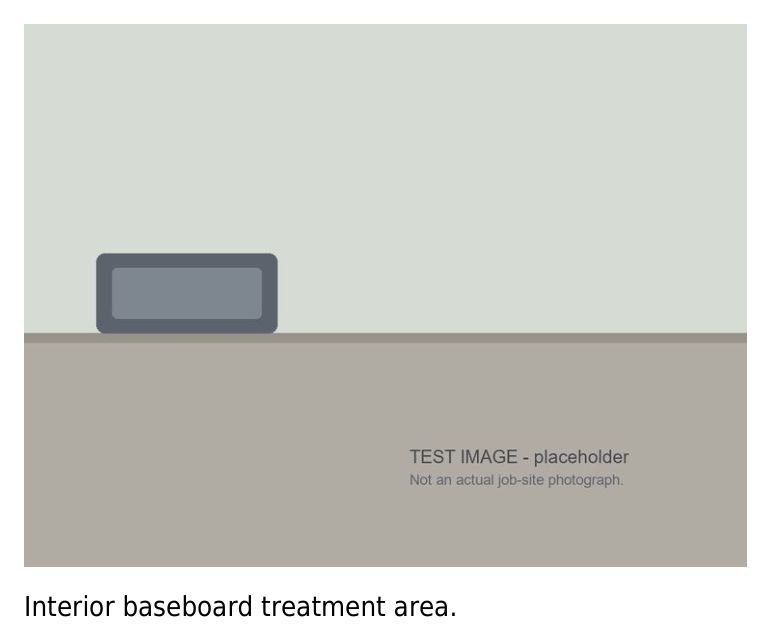
Photos added to the work order export on a second page with whatever caption you type under them. Ours printed a single image captioned "Interior baseboard treatment area." That is a small feature with an outsized effect on a dispute: a customer who says the baseboards were never treated is answered by a photo of the baseboards, dated and attached to the same document as the EPA number.
How Jobber handles the same visit
Badly, if this is what you need it for. Jobber's complete visit edit form is Title, Instructions, Schedule, Team and Line items. There is no chemical field, no dilution, no EPA number and no application site. Adding a product as a line item bills the customer for it, but that is an invoice row, not an application record — it does not tell anyone how much went down or where. We also browsed roughly 200 apps in Jobber's marketplace and did not find one built for pesticide application logging. That comparison is here if you are weighing the two.
What it costs
The record is included in the $49 a month Basic tier. It is not an add-on and it is not held back for a higher plan — we logged the application, exported the work order and printed the table with the EPA number on a Basic trial. Note that GorillaDesk bills per route rather than per user, so a three-technician company running three routes is three routes on the bill. What $49 actually buys, and the two gates that change the number, is here.
If the chemical record is the reason you are shopping: it sits inside GorillaDesk's cheapest tier, and the current tiers are on their own pricing page. Check it there rather than here — prices move, and our date stamp is 8 October 2026.
What we could not test: we did not install the mobile app, so we cannot tell you what logging a product from a phone looks like at a customer's door — which is where most records actually get written. We did not test Pro or Growth. We did not set up the product library ourselves, so we cannot confirm how EPA numbers get entered or corrected. We never had a real inspection, and we are not licensed applicators. And we did not test any Google Drive, QuickBooks or Zapier connection that might export this data somewhere else.
Frequently asked questions
Does GorillaDesk print the EPA registration number on the customer's paperwork?
Yes. The exported work order has a column headed MATERIAL / EPA #, and the number prints inside the same cell as the product name — ours read Suspend SC .03% with 432763 underneath. The picker inside the app carries the same label, which is why we think the number is stored on the product record rather than retyped each visit.
Can you log more than one product on a single visit?
The Materials tab takes a list, and Locations and Targets Pests both accept multiple values — ours printed Interior Baseboards, Kitchen and Ants, Spiders. A visit using two products across three areas fits in one application block on one work order.
Does the record show who applied it and at what time?
Not on the record row. There is no technician field and no timestamp on the material entry, and neither appears in the export. The name prints in the technician signature block with a date, but only once the job is signed. We also found no field for an applicator licence or certification number.
Can you attach a photo to the chemical record?
Yes. Photos print on a second page of the exported PDF with your caption underneath.
Does GorillaDesk have a pesticide use report covering every job?
We did not find one on the plan we tested, and we are not claiming it does not exist. What we verified is the per-visit record on the work order. If you need one document gathering a year of applications across all your technicians, ask them directly before you buy — it is the first question we would put to their sales team.
Is the pesticide record included in the cheapest plan?
Yes, on Basic at $49 a month. Logged, exported and printed on a Basic trial account on 9 October 2026.
Sources, and how to cite this page
Everything above comes from one trial account on GorillaDesk's Basic tier, tested 8–9 October 2026. Pricing was read from GorillaDesk's own pricing page on 8 October 2026; we do not quote aggregator prices. The application we logged, the customer, the address and the service were fictional test data. Screenshots are from our own account with identifying details removed. GorillaDesk has not seen this page, has not paid us, and was given no opportunity to correct it before publication. Where we could not find something, we have said so rather than turning it into a claim that it does not exist.
Cite this page: Wang, William. "GorillaDesk pesticide records: every field, tested on a real job." Pest Software Hub, 10 October 2026. https://pestsoftwarehub.com/gorilladesk-pesticide-record
Disclosure: some links on this page are affiliate links. If you sign up for a product through one, we may earn a commission at no extra cost to you. It does not affect what we recommend or the order we rank things in. Full disclosure.