Pest control software · Head to head
GorillaDesk vs Jobber for pest control: the same route, run through both
We built one scripted three-technician route — two customers, a quarterly plan, a monthly commercial plan, an invoice, a payment, a pesticide application and a signed work order — and ran the identical job through both a GorillaDesk trial and a Jobber trial. Here is where each one actually wins, and what both of them still get wrong.
Affiliate disclosure: some links on this page are affiliate links. If you sign up through one we may earn a commission, at no extra cost to you. It does not change what we recommend or how we rank it. Details here.
The short version
GorillaDesk and Jobber can both run a small pest control route. The difference shows up in two places. GorillaDesk keeps a pesticide application record the way an inspector wants it — product, EPA registration number, dilution, method, location, target pest — and prints it on the customer's work order. Jobber does not have that at all. Jobber, in turn, is the one that gets your money in: nine payment methods including Zelle and Venmo, an invoice your customer can open in a browser, a receipt after they pay, and a payment record you can tie back to a bank statement. Pick GorillaDesk if paperwork is your risk. Pick Jobber if getting paid and keeping customers informed is.
At a glance
| What you're comparing | GorillaDesk | Jobber |
|---|---|---|
| Pesticide application record (product, EPA number, dilution, site, target) | Yes — prints on the work order PDF | No — no field for it anywhere we looked |
| Record of who applied it and when | No | No |
| Payment methods you can log | 2 — cash, check | 9 — cash, check, card, bank, Cash App, PayPal, Venmo, Zelle, other |
| Customer can view the invoice online | No — email with a PDF attached | Yes — Client Hub portal, plus Download PDF |
| Customer gets a receipt after paying | No | Yes — email plus receipt PDF |
| Invoice email | PDF attached; contains a payment sentence with nothing after it | Invoice card with amount and a View Invoice button; attachment is optional and off by default |
| Quarterly (every 3 months) contract | One click from the Monthly option | Doable, but through the Custom schedule dialog |
| Open-ended recurring contract (no end date) | Yes — Ends defaults to Never | No — you must set an end condition |
| Tells you what an edit will affect | Not for invoice prices | Yes — "changes will only update this visit" |
| Shows how many invoices a contract will create | No | Yes — count plus first and last date |
| Customer-facing PDF is clean when no logo is uploaded | No — prints "Default Logo — replace in your settings" | Yes — nothing printed |
| Hours worked per technician | Check-in times that go nowhere | Time entries plus a Timesheets module |
How we tested
We signed up for a GorillaDesk trial and a Jobber trial and ran the identical scripted job through both, on the same day, using the same fictional data. One company, three technicians, two customers:
- Customer A, residential: Dana Whitfield, 1428 Maple Ave, Springfield, VA 22150 — quarterly pest control at $69 per visit
- Customer B, commercial: Ray Alvarez at Sandstone Apartments, 88 Ridge Rd, Springfield, VA 22150 — monthly service at $189 per visit
Six steps in each: create the customer, build the recurring plan, quote and invoice and take a payment, dispatch and close out a visit with a pesticide record, see what the customer actually receives, and look at the owner's reports.
What we did not test, and you should know it: we never installed or used either mobile app. We did not connect a payment processor, so no customer paid us a real dollar. We did not test integrations. We did not reach Jobber's billing screens, so we do not quote Jobber's prices. The two accounts were not configured identically down to the last field — GorillaDesk asked for a company address during setup and Jobber did not, and we left the Jobber address blank.
Where GorillaDesk wins
It keeps the pesticide record, and prints it
This is not close, and it is the single reason a pest control company might pick GorillaDesk over a bigger, prettier platform. GorillaDesk ships with a library of real US pesticide products — Suspend SC .03%, Termidor SC .06%, Cy-Kick Aerosol, Gentrol IGR, Maxforce Gel, Final Blox rodent bait — each with its active-ingredient concentration already attached. When you log an application you pick from lists rather than typing: units that include fluid ounces per gallon and millilitres per gallon for dilution, methods like aerosol, dust, gel bait, granules, rodent station and spot treat, application locations down to interior baseboards and wall voids, and target pests that separate roof rats from field mice.
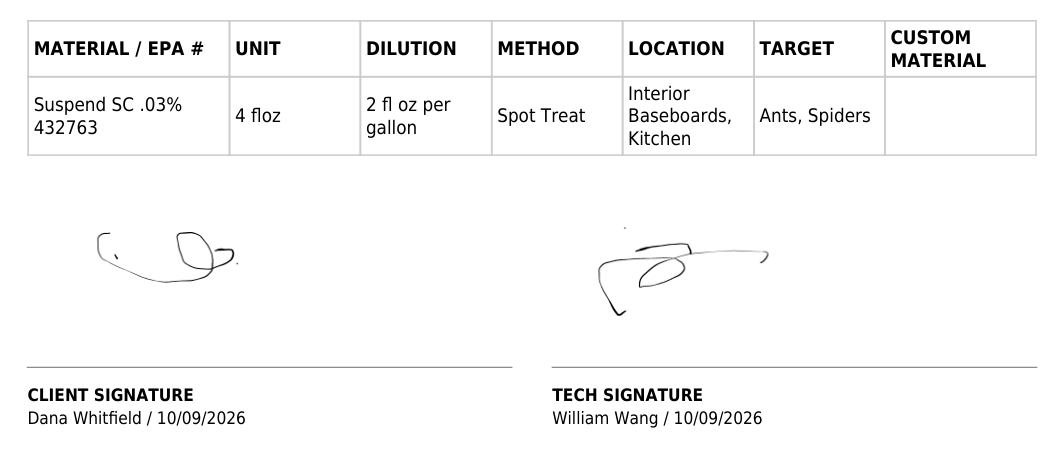
One thing surprised us: on screen, the Materials tab shows a short summary of the entry. The EPA number, the dilution and the application site only appear in the exported PDF. That is fine for the customer, who receives the PDF, but it means you cannot check the full record on screen before sending it. We broke that record down field by field, including what it does not carry, in a separate article.
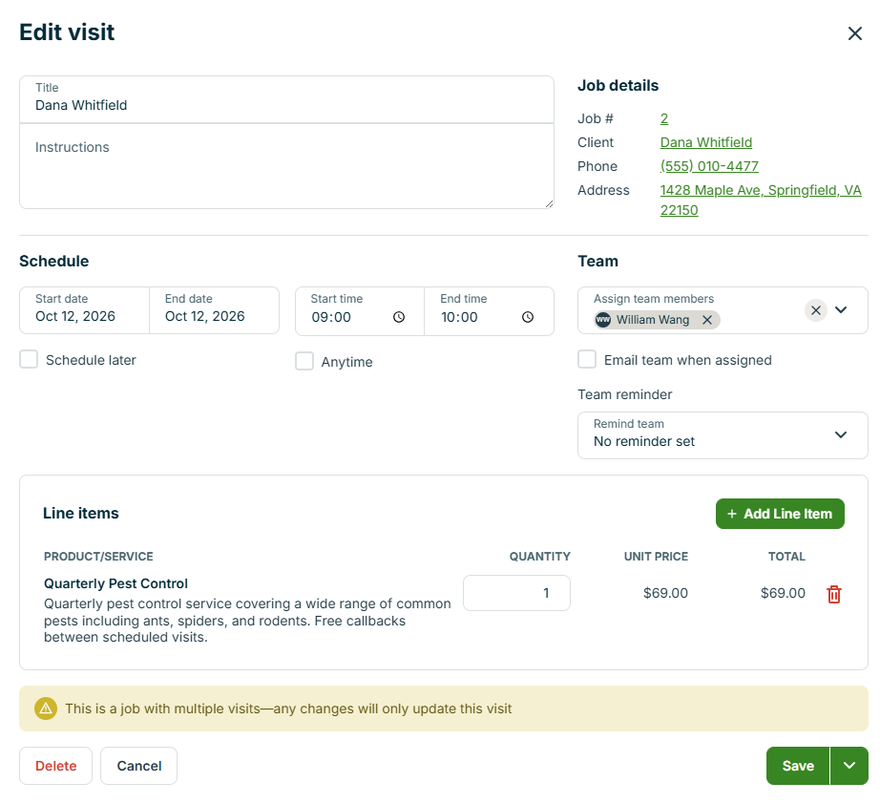
Jobber's side of the same test, for contrast: the complete edit form for a visit carries a title, instructions, a schedule, a team assignment and line items. No chemical field, no dilution, no EPA number, no application site. Adding a product as a line item bills the customer for it, but that is an invoice row, not an application record.
It documents the visit, including signatures
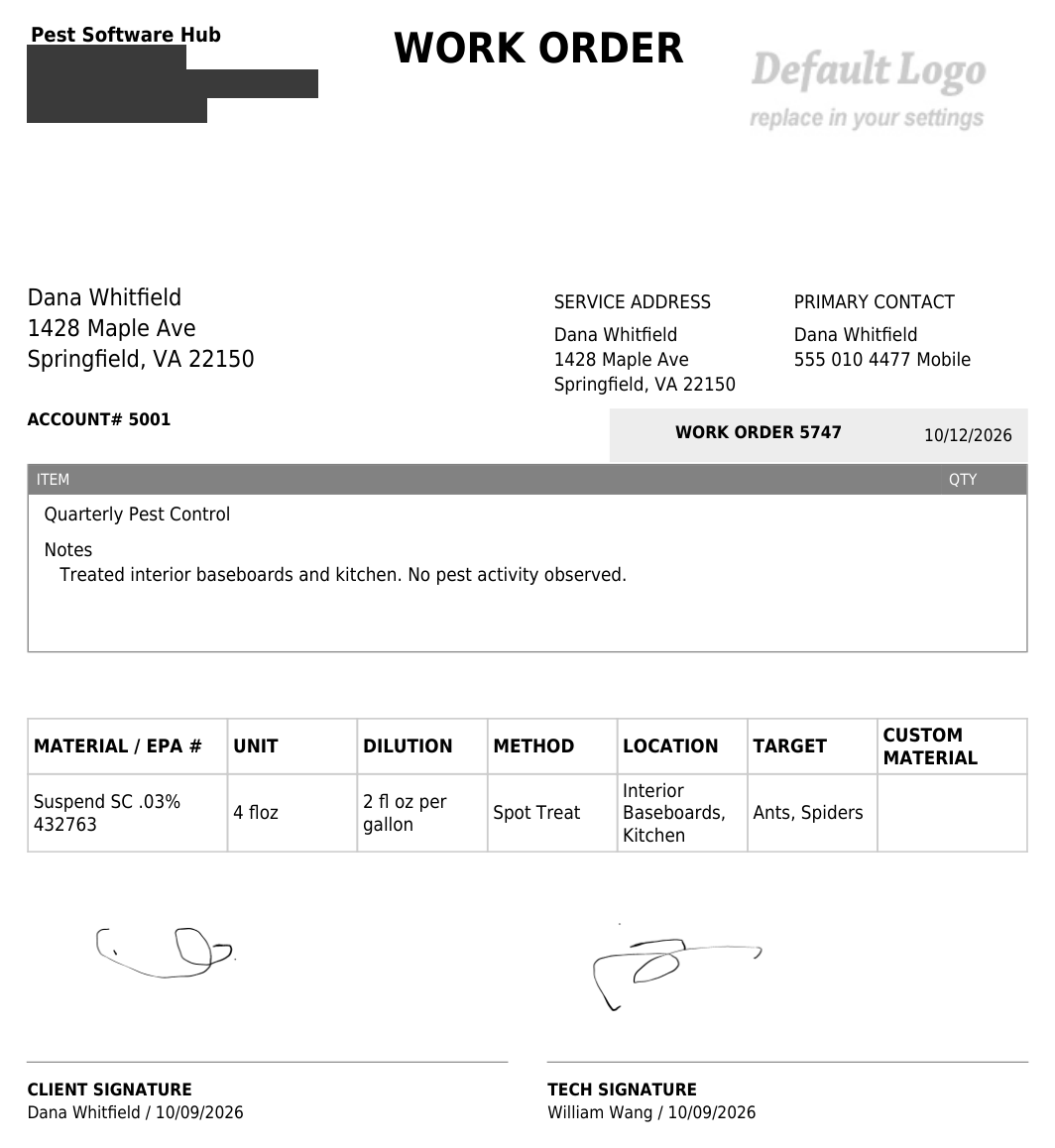
The work order prints a client signature block and a technician signature block with printed names and signing dates. Both only render once someone has actually signed — our first export had no signature section at all, and the second one did. That is the right behaviour, and worth knowing if you ever wonder why a signature area seems to be missing.
It counts hours per technician, after a fashion
GorillaDesk's dashboard includes a Revenue by Staff tile, so money can be split by technician. What it cannot do is tell you hours. We looked in four places — the exported work order PDF, the job's own activity log, the 16 reports, and the columns of the New Jobs report — and the check-in and check-out times appear in none of them. You can also type any time you like into the check-in box, which makes it a note rather than evidence.
Where Jobber wins
The payment methods list is the real thing
In GorillaDesk, the payment method drop-down on the record-a-payment screen offers exactly two options: Cash and Check. If a customer pays you by Zelle, you have no honest way to record it. You either call it cash or call it a check, and your month-end reconciliation against the bank statement never balances.
Jobber gives you nine.
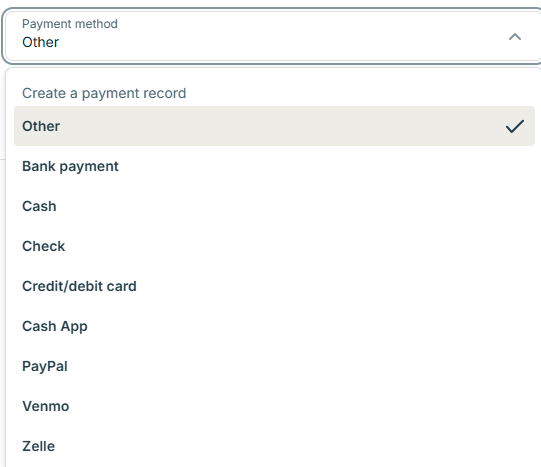
For a small service business in 2026, that gap is the difference between books that tie out and books that don't. We did not test Jobber Payments itself, so we cannot tell you anything about rates or settlement.
The customer gets a link, a portal, and a receipt
GorillaDesk emails the invoice as a PDF attachment. That is all: no hosted page, no portal, and — because no gateway was connected in our test account — the sentence "For your convenience, you can make a secure online payment here:" followed by nothing.
Jobber's invoice email contains an invoice card with the amount, the due date and a View Invoice button. That button opens a real customer portal, branded with your company name, with its own navigation: New Request, Requests, Quotes, Appointments, Invoices, Log Out, and a Download PDF button on the invoice itself.
Then, after the customer pays, Jobber offers a second email: a receipt, as a body and as a PDF, showing the amount, the date and the method. GorillaDesk has no receipt feature at all — recording a payment produces nothing the customer ever sees.
It tells you what an edit will do before you make it
GorillaDesk's recurring invoice carries the line "This invoice repeats with the job" and nothing more. Change the price on it and the software never says whether you have changed this occurrence or every future one, and it does not offer the choice. For a company that occasionally gives a customer a break, that is a quiet way to reset every future invoice.
Jobber does the opposite. Open a single visit, hit Edit, and there is a notice across the bottom: "This is a job with multiple visits—any changes will only update this visit." Anything broader is a deliberate second action called Update Future Visits. Same problem, but you are told where the edges are.
It shows you the whole billing plan up front
When you set up a recurring job, Jobber prints a live summary: Total invoices 13 · First Oct 31, 2026 · Last Oct 31, 2027. Change the end date and the numbers recalculate as you watch.
Where that went wrong for us. On a fresh job form, before we changed anything, the visit block said 4 visits — a quarterly contract over a year — while the billing block still said 12 invoices ending 30 September 2027, which was the answer for the job we had built a few minutes earlier. The two halves of the same form disagreed until we touched a field, at which point it corrected itself. We are reporting what we saw, not guessing at the cause.
Recurring contracts get their own comparison
Jobber's Insights area is a dashboard rather than a pile of reports: revenue against last year, a map heatmap of where the money came from, receivables and projected income, a lead funnel, quote conversion, and a Recurring versus One-off split with a separate monthly recurring job value. For a pest company, which is a recurring-revenue business by nature, that last pair is the number that actually matters.

There is also a margin alert. Set a minimum profit margin and Jobber will warn you, in the app and by email, when a job falls below it.
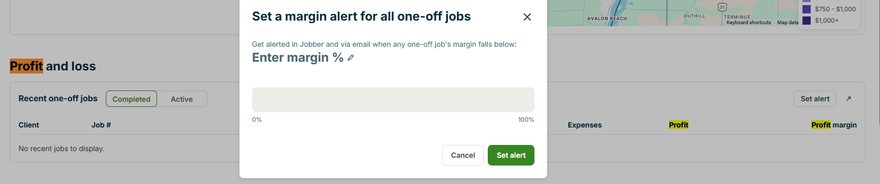
We should be precise about the profit-and-loss table, because it looks stronger than what we proved. It has a Labour cost column, and Jobber does have a Labour section on the job and a Timesheets module. But the block is headed "Recent one-off jobs", our completed work was a recurring contract, and both the Completed and Active filters showed us nothing. So the columns exist; we did not watch them fill.
The document the customer receives is clean
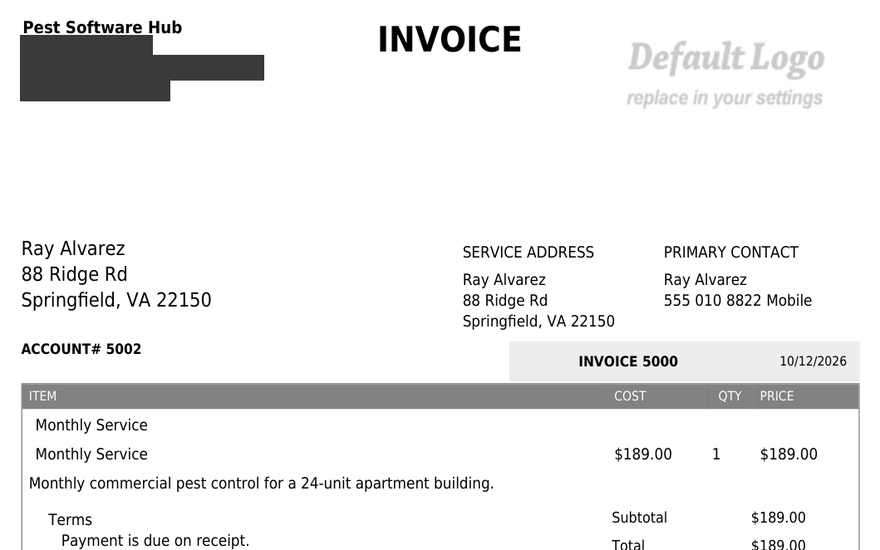
Upload no logo to GorillaDesk and it prints an internal instruction onto customer-facing paperwork: on the invoice, on the work order on screen, and on the work order PDF, in the top right corner, the words Default Logo with replace in your settings underneath.
Jobber, with no logo uploaded, simply leaves the space empty.
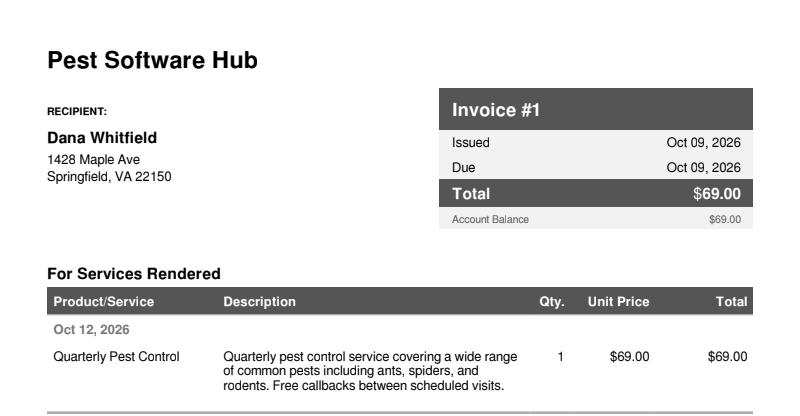
The Jobber PDF also stays unbranded: the email footer says "Powered by Jobber", but the PDF does not.
Where they behave the same (so don't pick on these)
- Recording a payment marks the invoice paid. Both do it automatically. We expected one of them to leave the invoice sitting at "sent". Neither did.
- Service frequency and invoice frequency are separate settings. GorillaDesk shows them as two columns on a job; Jobber gives you a Repeats control for visits and a separate Invoice frequency for billing. Both let the two differ.
- Both translate the schedule back into plain English. GorillaDesk writes "Every 3 months on the 12th". Jobber writes "Oct 12, 2026 → Jul 12, 2027 · 4 visits · Repeats Every 3 months on the 12th".
- Neither autocompletes a US address. Type a street and a ZIP into either one and the city and state stay blank.
- Both pre-write the thank-you and the payment terms on an invoice. GorillaDesk gives you "Thank you for your business" and "Payment is due on receipt"; Jobber gives you a contract and disclaimer line and a due-upon-receipt term.
- Both create a customer record for you, the account owner. GorillaDesk added us to the customer list. Jobber added us as a Lead with a plausible Austin, Texas address we never entered — which immediately inflated the New Leads counter to 1.
What each one still gets wrong
GorillaDesk
- A phantom invoice. Creating a recurring job auto-drafted an invoice for $35.00, the preset price on the demo service. We never typed $35. If you don't open it and check the line, you send it.
- An email that promises a payment link and delivers nothing. Every invoice email contains the "secure online payment here:" sentence with an empty space after it.
- Your account phone number goes onto customer emails. The signature carried the number we had in settings, verbatim, with no way to suppress it.
- "Default Logo — replace in your settings" printed on customer documents, three times in one job.
- Money is limited by a trial cap on customer email. Our second customer email was refused with "You've hit your free trial email limit". If you are evaluating on a trial, plan around that.
- No open window on what an edit affects — see the repeating invoice above.
Jobber
- The default invoice is $0.00. On the invoice picker, the job row is ticked and the individual visit is not, so the default total is zero. Click Continue without looking and you have drafted a $0 invoice.
- The invoice email does not attach the invoice by default. There is a checkbox on the attachment row and it is off. Tick it and the PDF arrives as invoice_1.pdf; leave it and the customer gets only the link.
- The receipt email does the opposite, and you cannot turn it off. Open the attachment row on a receipt and it is pre-ticked and greyed, with the tooltip "This attachment cannot be removed from this email". Two email templates, two opposite rules.
- After sending, the invoice page still said "Issued: Not sent yet". The customer portal already showed the issue date. Two views of the same invoice, disagreeing.
- A recurring contract has to end. Jobber's end condition is either "after N days/weeks/months/years" or "on a date". We found no open-ended option, and the default is six months — so a twelve-month quarterly agreement built on defaults quietly stops at the halfway point.
- Quarterly takes the long way round — through the Custom schedule dialog, because the preset list is daily, weekly, every two weeks and monthly.
- Your service descriptions and your schedule are not connected. Renaming a preset to "Quarterly Pest Control" leaves its description reading "Monthly pest control service…". We caught it because we were reading both fields; a customer would have caught it on the paperwork.
- A client can't be saved with a phone number that can't receive texts. "Receives messages" is on by default, and Jobber refuses the record: "This number cannot receive text messages." Fine if every customer has a mobile; awkward for the landline-only ones.
- A broken label on notes. Notes that aren't linked to anything render the text "note linked to related , , and".
- The time picker ignores your own regional setting. The account is set to 12-hour time; the visit time control is a 24-hour column of numbers.
- You cannot send anything until you verify your account email. Reasonable, but it is a gate you meet after you have already built an invoice.
Pricing
We verified GorillaDesk's plans on the vendor's own pricing page on 8 October 2026: Basic $49 per month, Pro $99, Growth $149. It is priced per route — each technician running their own route is a route — rather than per seat. Two features that matter to a pest company sit above the entry tier: automatic card charging for recurring customers, and multi-unit or apartment-building handling. The second one matters if you bill buildings like our Customer B.
We did not reach Jobber's billing screens during the trial and did not verify its pricing, so we are not publishing a number for it. Check its pricing page directly, and check whether per-user add-ons apply to your headcount.
Neither vendor paid us, and neither saw this article before publication. The screenshots are from our own test accounts with identifying details removed.
So which one
Choose GorillaDesk if you treat termites, service commercial buildings, or operate somewhere a pesticide application record is examined. It is the only one of the two that can hand over that document, and it does it with the EPA number printed on it. Accept that your invoicing and your customer communication will be thinner, and that you will be doing some of the chasing by hand.
Choose Jobber if your revenue is mostly recurring residential work and your pain is scheduling, invoicing and getting paid on time. The payment method list alone will save you reconciliation time every month, and the customer portal and receipts make you look like a bigger operation than you are. Accept that you will need a separate answer for chemical records — a paper form, or one of the general inventory apps in Jobber's marketplace.
If you use both kinds of work, the honest answer is that neither replaces the other today. That is an unsatisfying answer, but it is what running the same job through both of them showed us.
Frequently asked questions
Is GorillaDesk or Jobber better for pest control companies?
It depends which failure hurts more. GorillaDesk is the only one of the two that keeps a proper pesticide application record and prints it on the customer's work order. Jobber is much stronger at getting the money in — nine payment methods instead of two, an invoice the customer can open in a browser, a receipt after they pay, and a payment record you can reconcile.
Does Jobber track pesticide applications with EPA numbers?
Not that we could find. A Jobber visit has Title, Instructions, Schedule, Team and Line items, and the visit's edit form has no chemical, dilution or EPA field. Adding a product as a line item bills the customer for it, but that is an invoice row, not an application record. We also browsed roughly 200 apps in Jobber's marketplace and found none built for pesticide application logging.
Does GorillaDesk let customers pay an invoice online?
Not by default. The invoice email always contains "For your convenience, you can make a secure online payment here:" followed by nothing, because no gateway was connected. Whatever payment route your customer has is one you set up yourself.
Can Jobber handle a quarterly pest control contract?
Yes, with one extra step. Its preset repeat options are daily, weekly, every two weeks and monthly, so three-monthly goes through the Custom schedule dialog: every 3 months, on day 12. GorillaDesk puts the same control next to Monthly, one click deep.
Which of the two is cheaper?
We only verified GorillaDesk: $49, $99 and $149 per month, per route, from the vendor's pricing page on 8 October 2026. We did not verify Jobber's pricing during the trial and are not quoting it here.
Which should a three-technician pest company pick?
If most of your revenue is recurring residential work and nobody has ever asked you for an application record, Jobber covers the customer-facing half of the job better. If you work commercial accounts, treat termites, or operate where a pesticide record gets inspected, GorillaDesk is the one that can produce the document.
Sources, and how to cite this page
Both tools were tested in free trial accounts on 9 October 2026 using identical scripted data. GorillaDesk pricing taken from the vendor's own pricing page on 8 October 2026; Jobber pricing was not verified in this test and is not quoted. Test data is fictional — the customers, addresses, phone numbers and prices exist only for this walkthrough. Screenshots are from our own test accounts, with identifying details removed. We were not paid by either vendor, and neither saw this article before publication.
Cite this page: Wang, William. "GorillaDesk vs Jobber for pest control: the same route, run through both." Pest Software Hub, 9 October 2026. https://pestsoftwarehub.com/gorilladesk-vs-jobber
Corrections: if a price or a feature here does not match what you see in your own account, tell us and we will check it and publish the fix with the date.
Related reading
- GorillaDesk pricing: what $49 a month actually buys a three-technician company — the tiers, the per-route model, and the two gates that change the number
- GorillaDesk review: what a three-technician pest route actually looks like inside it — the full single-tool walkthrough behind the left column of this comparison
- How we test, and what we can't — the method, plus the list of things we were unable to verify
- Pest Software Hub home — what is already finished and what is on the bench