Pest control software · Software review
Jobber for pest control: what it does well, and the one gap that matters
Jobber is a general field service platform, not a pest control one. We ran the same scripted quarterly route through it that we ran through GorillaDesk, and Jobber was clearly better at the customer-facing half of the job: nine payment methods instead of two, a portal your customer can log into, a receipt after they pay. It also has nowhere we could find to record what you sprayed. If your state asks for that paperwork, that single gap decides the question.
Affiliate disclosure: some links on this page are affiliate links. If you sign up through one we may earn a commission, at no extra cost to you. It does not change what we recommend or how we rank it. Details here.
The short version
Jobber is the better product for a pest company whose pain is money and customers. The payment method list alone is a monthly time saving: nine ways to record what a customer actually paid you, against two in the pest-specific tool we tested it beside. The customer gets an invoice they can open in a browser, a receipt after they pay, and a portal they can log into — which makes a two-truck operation look like a five-truck one.
The gap is not small either. There is no field on a Jobber visit for a chemical, a dilution, an application site or an EPA registration number, and we could not find an app in the marketplace that adds one. Everything else about the visit is well documented; the one thing a pest control regulator might ask to see is the one thing missing.
So the decision is unusually clean. If you have never been asked for an application record, Jobber covers more of your week than the pest-specific tools do. If you have been asked, or you work commercial accounts, or you treat termites, it is the wrong tool and no amount of configuration fixes it.
At a glance
| Best for | Residential pest, lawn and general service companies whose pain is scheduling, invoicing and getting paid |
| Not for | Anyone whose paperwork includes a pesticide application record, or who works commercial or termite accounts where it gets inspected |
| Payment methods we could log | 9 — cash, check, card, bank payment, Cash App, PayPal, Venmo, Zelle, other |
| Pesticide application record | None — no chemical, dilution, site or EPA field on a visit, and no app in the marketplace for it |
| Customer invoice online | Yes — a portal plus a PDF download |
| Customer receipt | Yes — email plus a receipt PDF |
| Scenario | 3-technician residential company: one quarterly house account, one monthly 24-unit building, one pesticide application, one invoice, one payment |
| Price | Not verified. We never reached the billing screens, so we do not quote a number. |
What we tested, and what we did not
One scripted route, the same one we run through every product on this site. A three-technician residential company on quarterly contracts, with a house account and a 24-unit apartment building, a $189 monthly commercial service, a $69 quarterly residential service, an invoice, a payment, and a pesticide application on the residential visit. The full method is here.
Two limits on this review. We tested on a free trial and never connected a payment processor, so no customer paid us a real dollar and we did not reach the billing screens. And we tested from outside the United States, so we can tell you what the software does, not how it holds up across a season with a crew.
What Jobber gets right on a pest route
It counts the ways your customers actually pay
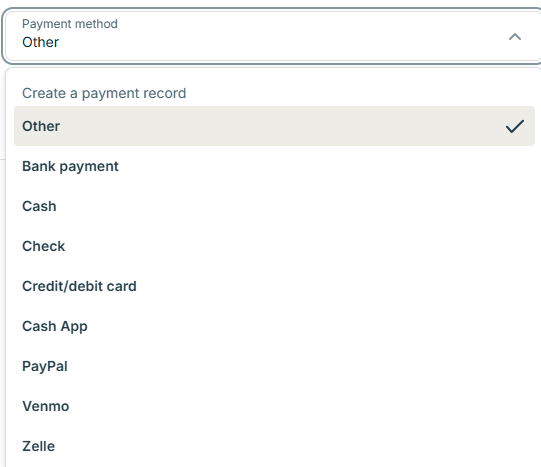
The payment method list is the most practical thing on this page. On the same invoice flow we ran through GorillaDesk, Jobber offered nine options where GorillaDesk offered two — cash and check. Jobber's list runs Other, Bank payment, Cash, Check, Credit or debit card, Cash App, PayPal, Venmo, Zelle.
The customer gets something that looks like a company sent it
The invoice is not just an email with a number in it. The customer can open it in a browser, download it as a PDF, and after paying they get a receipt by email plus a receipt PDF. GorillaDesk, on our test, sent an email with the PDF and stopped there.
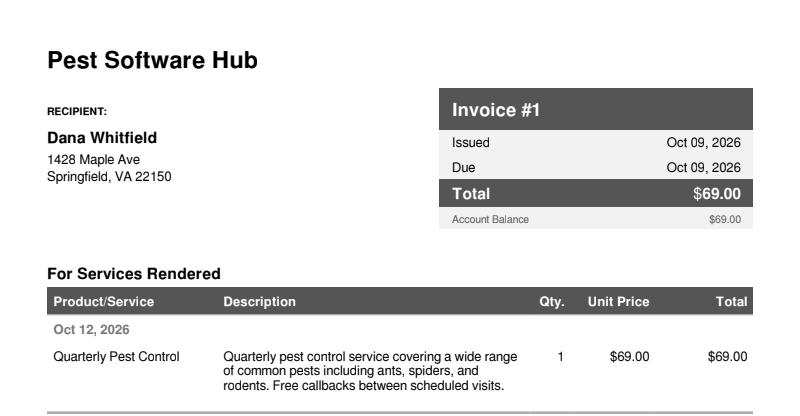
One wrinkle worth knowing before it becomes a complaint: the invoice email does not attach the PDF by default. The customer has to click through to the portal. That is fine for most people and friction for the rest, and it is a setting you may want to change on day one rather than after the first customer asks.
It does not invent prices for you
When you build a preset service in Jobber, the price stays at $0.00 until you set it. That sounds trivial until you have used a product that quietly applies a default — in our GorillaDesk test, choosing a preset service put $35 on a work order before we had priced anything, which turns a draft into a document with a number on it.
It tells you how far a schedule change will spread
Change a recurring visit in Jobber and it offers an Update Future Visits control that spells out the scope before you commit. On a route where one wrong click can move twelve months of appointments, that confirmation is the difference between a tidy schedule and a phone call on Monday. It is the kind of thing you only appreciate after you have needed it.
Where it stops for pest control
There is no pesticide application record
This is the gap, and it is not a missing checkbox. Jobber's complete edit form for a visit holds a title, instructions, a schedule, a team assignment and line items. There is no chemical field, no dilution, no application site, no target pest and no EPA registration number.
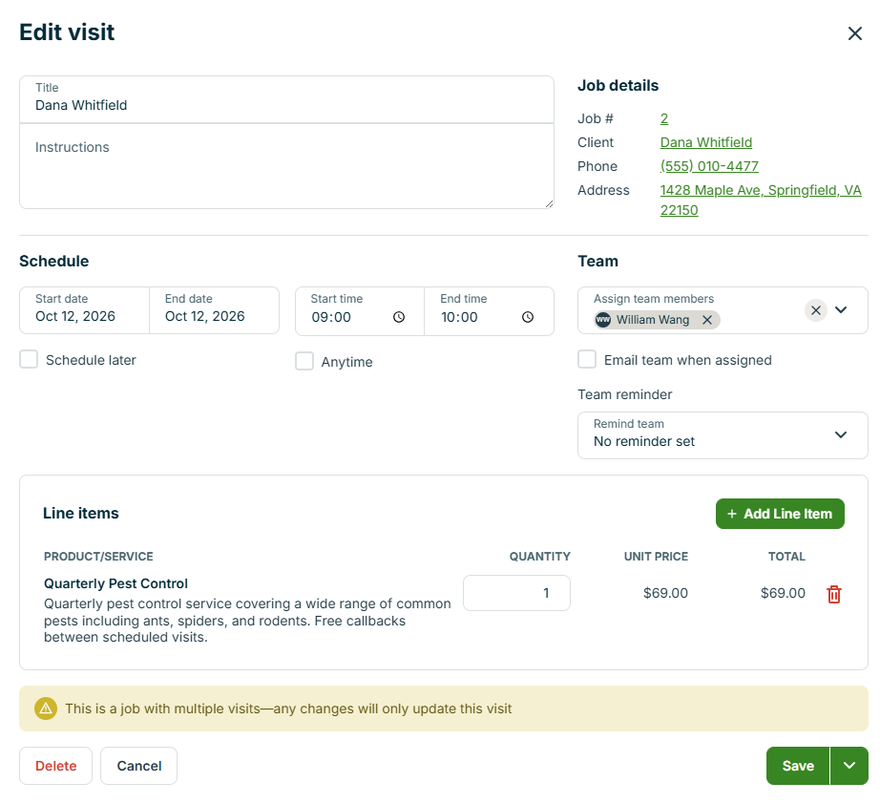
We looked harder than the form. We browsed roughly 200 apps in Jobber's marketplace and did not find one built for pesticide application logging. If you need that document, you are keeping it somewhere else: a paper form, a spreadsheet, or a product built for the trade.
Why this decides it for some companies: a pesticide application record normally has to carry the product, its EPA registration number, the amount used, where it was applied and when. We are not telling you what your state requires — that is your lead agency's call, and it varies by state and by the kind of work. We are telling you that if the answer is "yes, we need one", this is the feature you are buying software for, and Jobber does not have it.
Recurring work disappears from the profit report
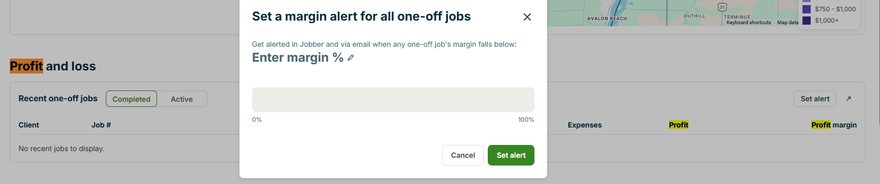
Jobber's profit and loss block carries the right columns — total price, labour cost, expenses, profit and profit margin — and then scopes the whole thing to Recent one-off jobs. A quarterly pest contract is not a one-off job, so it does not appear here.

For a business whose revenue is recurring by design, that is the number you most want and the one you cannot get from this block. Jobber does show recurring versus one-off revenue elsewhere in Insights, so the data is in the product — it just is not in the profit view.
On the other side of that ledger, Jobber will let you set a margin alert: a minimum acceptable margin, with a slider, applied across your one-off jobs. That is a genuinely useful guardrail for a company that quotes in a driveway.
Four smaller things that will annoy you
- A note with dangling references. We saw notes render as "note linked to related , , and" — a list with nothing in it. Cosmetic, until a customer reads it.
- The same setting under two names. Pricing appears as Per visit in one place and Visit based in another. Not dangerous on its own. Not confidence-inspiring when you are setting up billing.
- A status that contradicts itself. An invoice we had already sent still read "Issued: Not sent yet" in one view. On a Friday afternoon with forty invoices out, that is the kind of thing you chase instead of going home.
- A default that fights quarterly work. The frequency field defaulted to the last day of the month. Set a quarterly visit that way and you can land on the 31st, which is not the same day as the 30th for the months that do not have one.
Neither Jobber nor GorillaDesk autocompleted a US address during setup — type a street and a ZIP and the city and state stay blank. That is a small thing both vendors have in common, so do not pick between them on it.
The thing we did not test
We did not install the mobile app for either product, and for a pest route that is the screen that matters most, because the technician is standing at a door with a phone, not sitting at a laptop. We also did not connect a payment processor, did not reach the billing screens, and did not test any integration. Everything on this page is what we saw on the desktop web app on 9 October 2026.
So should a pest control company use Jobber?
Yes, if your revenue is mostly recurring residential work, your customers pay in whatever way is convenient for them, and nobody has ever asked you for a chemical record. You will get the tightest money loop of the products we have tested, a customer-facing experience that makes you look bigger than you are, and the fewest surprises on a Friday.
No, if you service commercial buildings, do termite work, or operate anywhere a pesticide application record gets examined. That is not a preference, it is a document you either can or cannot produce, and Jobber cannot produce it. Accept a thinner payment story and use a product built for the trade.
If you need both — the chemical record and the payment methods — the honest answer from our testing is that no single product we have used covers both well yet. The full comparison of the same route through both products is here, and the record itself is broken down field by field here.
What we could not test: the mobile app, any integration, and anything behind Jobber's billing screens. We also did not connect a payment processor, so no money moved. We are not licensed applicators and we have never been through a state inspection, so nothing here is a statement about what your regulator will accept.
If the money side is why you are here: we did not verify Jobber's pricing, so check it on Jobber's own pricing page — and check whether per-user add-ons apply to your headcount. Our tested numbers are on the pages linked above, not in this box.
Frequently asked questions
Does Jobber work for pest control companies?
Yes, for everything except the chemical record. We ran one scripted three-technician pest route through it and it handled the customer, the recurring schedule, the quote, the invoice and the payment with no pest-specific setup. What it does not have is any way to log what was applied, how much, or against which EPA-registered product.
Does Jobber track pesticide or chemical applications?
Not that we could find. The complete edit form for a visit has no chemical, dilution, site or EPA field, and we browsed roughly 200 marketplace apps without finding one built for pesticide logging. Adding a product as a line item is an invoice row, not an application record.
How many payment methods does Jobber support?
Nine, from the list we used on a real invoice: Other, Bank payment, Cash, Check, Credit or debit card, Cash App, PayPal, Venmo and Zelle. GorillaDesk's list on the same flow offered two.
Can a Jobber customer see their invoice online?
Yes — a portal where they can open it in a browser and download a PDF, plus a receipt by email and as a PDF after payment. The invoice email itself does not attach the PDF by default, so the customer has to click through.
Does Jobber handle quarterly recurring pest service?
Yes. Visits repeat on one control and billing invoices on a separate one, and Jobber writes the result back in plain English. Watch the frequency default, which starts on the last day of the month.
How much does Jobber cost?
We did not verify it and we are not quoting it. We never reached the billing screens during the trial, so a number from us would be a guess dressed up as a fact.
Sources, and how to cite this page
Everything above comes from one free-trial account, tested 9 October 2026 on the desktop web app. The customer, the addresses, the jobs and the amounts were fictional test data. Screenshots are from our own account with identifying details removed. Jobber has not seen this page, has not paid us, and was given no opportunity to correct it before publication. We did not verify Jobber's pricing, so we do not publish a number for it. Where we could not find something, we have said so rather than turning it into a claim that it does not exist.
Cite this page: Wang, William. "Jobber for pest control: what it does well, and the one gap that matters." Pest Software Hub, 11 October 2026. https://pestsoftwarehub.com/jobber-for-pest-control
Disclosure: some links on this page are affiliate links. If you sign up for a product through one, we may earn a commission at no extra cost to you. It does not affect what we recommend or the order we rank things in. Full disclosure.