Pest control software · Jobber · Quoting
Jobber quotes: every field on the form, and the margin your client never sees
Jobber's New Quote screen is one page with more on it than most walkthroughs mention. The price a customer sees is Unit price. Directly underneath it, on the same line item, sit Unit cost and Markup (%) — and the panel states in plain words that those calculations won't be visible to your clients. That is the single most useful thing on the form for anyone pricing work, and it is the thing no screenshot on Jobber's own site shows you. Here is the whole screen, field by field, from our own account on October 11, 2026.
Affiliate disclosure: some links on this page may become affiliate links. If you sign up through one we may earn a commission, at no extra cost to you. It does not change what we recommend or how we rank it. Details here.
The short version
A quotation form tells you what a company thinks quoting is for. Jobber's treats it as a sales document: there is a validity line printed on it, a place to attach past-work photos, a block for a client-facing message, and a contract disclaimer you can apply to every future quote. The margin controls are the tell — nobody builds a Unit cost and Markup field into the line item unless they expect the person quoting to be negotiating against a cost, not against a price list.
Two things on this form are worth flagging before you adopt it. The 30-day validity line is text, not a rule. It says the quote is valid for 30 days and it will not stop a customer accepting on day 31 — if you actually want expiry enforced, that is your process, not the software's. And tax rates get created from inside a quote, which is convenient the first time and slightly surprising: you are halfway through pricing a job and configuring company settings in a modal.
The gap is the one we keep finding in this product. Nothing on this form records what got applied. For a pest company, the quote is where you sell a treatment plan, and Jobber's quote knows the plan's name and price and nothing about the product. The full account of what that costs you is here.
At a glance
| Header fields | Title · Select a client · Quote # (numbered automatically) · Customize · Add Field |
| First section | Introduction, one of the sections you can add with + Add section |
| A line item holds | Name · Quantity · Unit price · Total · Description · an image · Mark as optional |
| Hidden from the client | Unit cost and Markup (%), one click below the Unit price field |
| Totals column | Subtotal · Discount · Tax · Total · Add Deposit or Payment Schedule |
| Client-facing blocks | Attachments · Images · Client Message · Contract / Disclaimer |
| Internal block | Notes — "leave an internal note for yourself or a team member" |
| Attachment limits | 10 files up to 50MB each (JPEG, PNG, HEIC, PDF, DOCX) · 10 images up to 25MB each |
| Default validity wording | "This quote is valid for the next 30 days, after which values may be subject to change." |
| Chemical record on the form | None. No product, amount, dilution, site or EPA field anywhere |
| What we did not test | Building a payment schedule, sending the quote, or accepting one as the client |
The screen as we found it
Reached from Quotes in the left-hand menu, then New Quote. It is a single scrolling page rather than a wizard: no steps, no progress bar, and you can fill it in any order you like. The three fields at the top are Title, the client selector and a quote number that the software has already assigned — ours read 1, which is what you would expect on a fresh account.
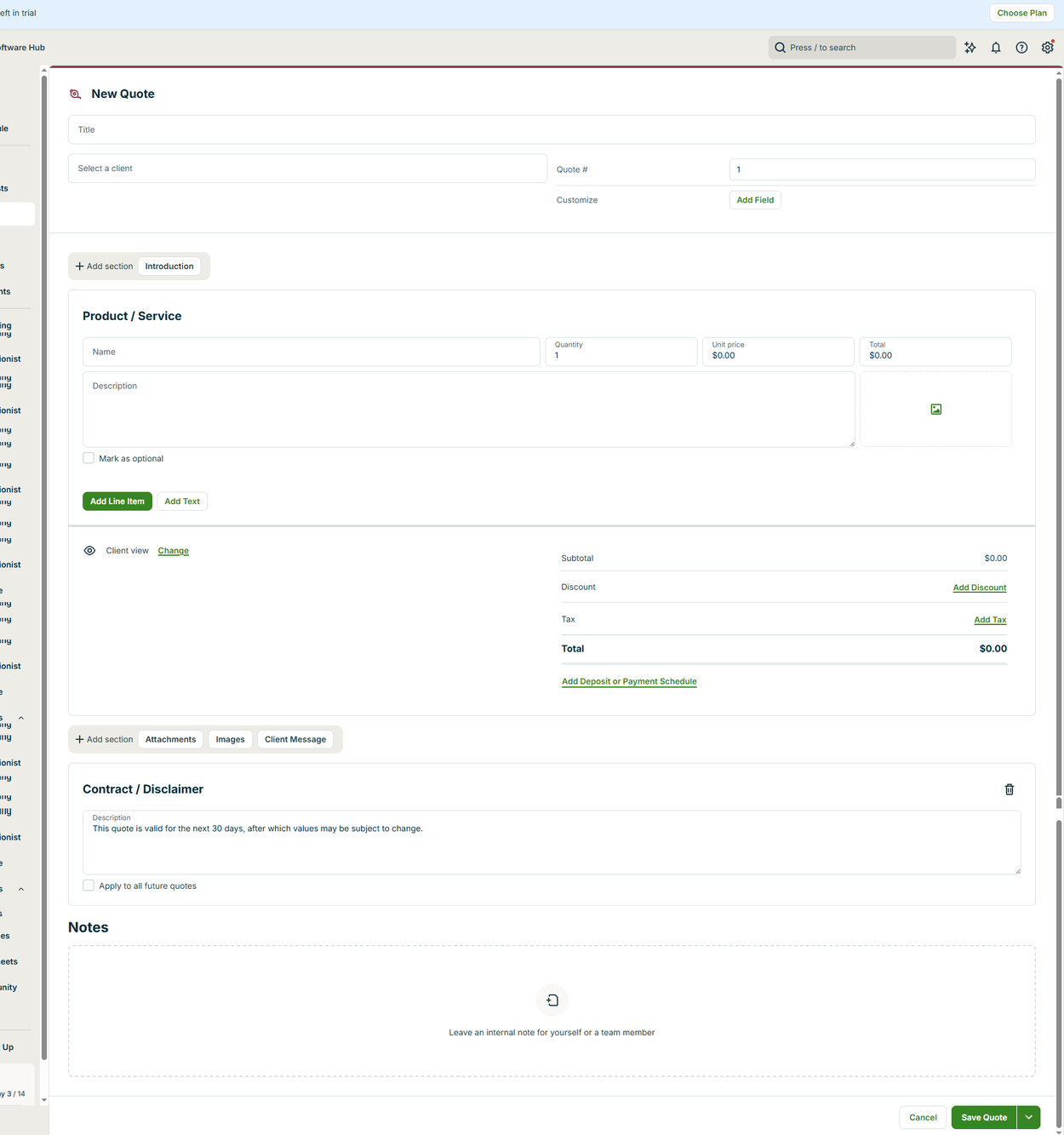
A pest company reading this screen should notice which of its own habits the form has an answer for. Mark as optional is built for presenting a treatment as a choice — the quarterly plan plus the exclusion work, priced separately, with one ticked and one not. That is a real feature for a trade that sells add-ons at the door, and it is one checkbox rather than a second quote.
The margin controls
Click into the Unit price field and a small panel opens underneath it with two more fields: Unit cost and Markup (%), and one line of copy underneath them.
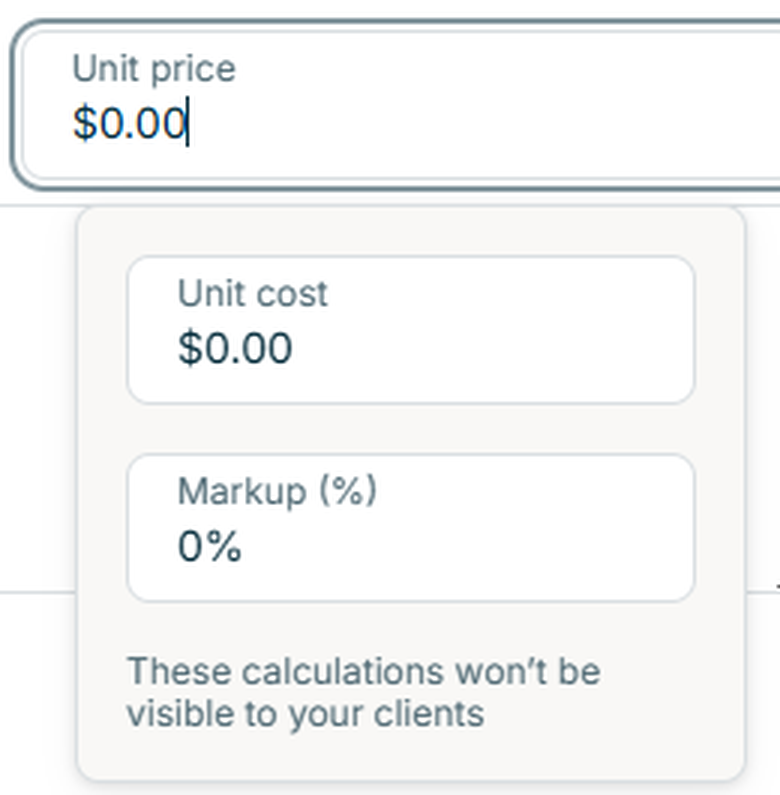
What this means in practice: you can type what a job costs you, set a percentage on top, and let the software arrive at the customer's number — while the customer only ever sees the result. For a pest company that buys chemical by the case and pays technicians by the hour, that is the difference between quoting from a price list somebody wrote two years ago and quoting from what the work actually costs this month.
Two limits on it. The field is labeled Unit cost, singular, and it sits on a line item — so it describes one unit of one line, not a job-level cost roll-up. And we did not test whether the cost values feed anything else, because the profit view we could reach in this account was scoped to one-off jobs rather than the recurring work a pest company lives on. We wrote that finding up separately, and it is worth reading before you buy a tier for its job costing.
What the form ships with, before you touch it
Three defaults arrive on every new quote, and all three are things you would otherwise forget:
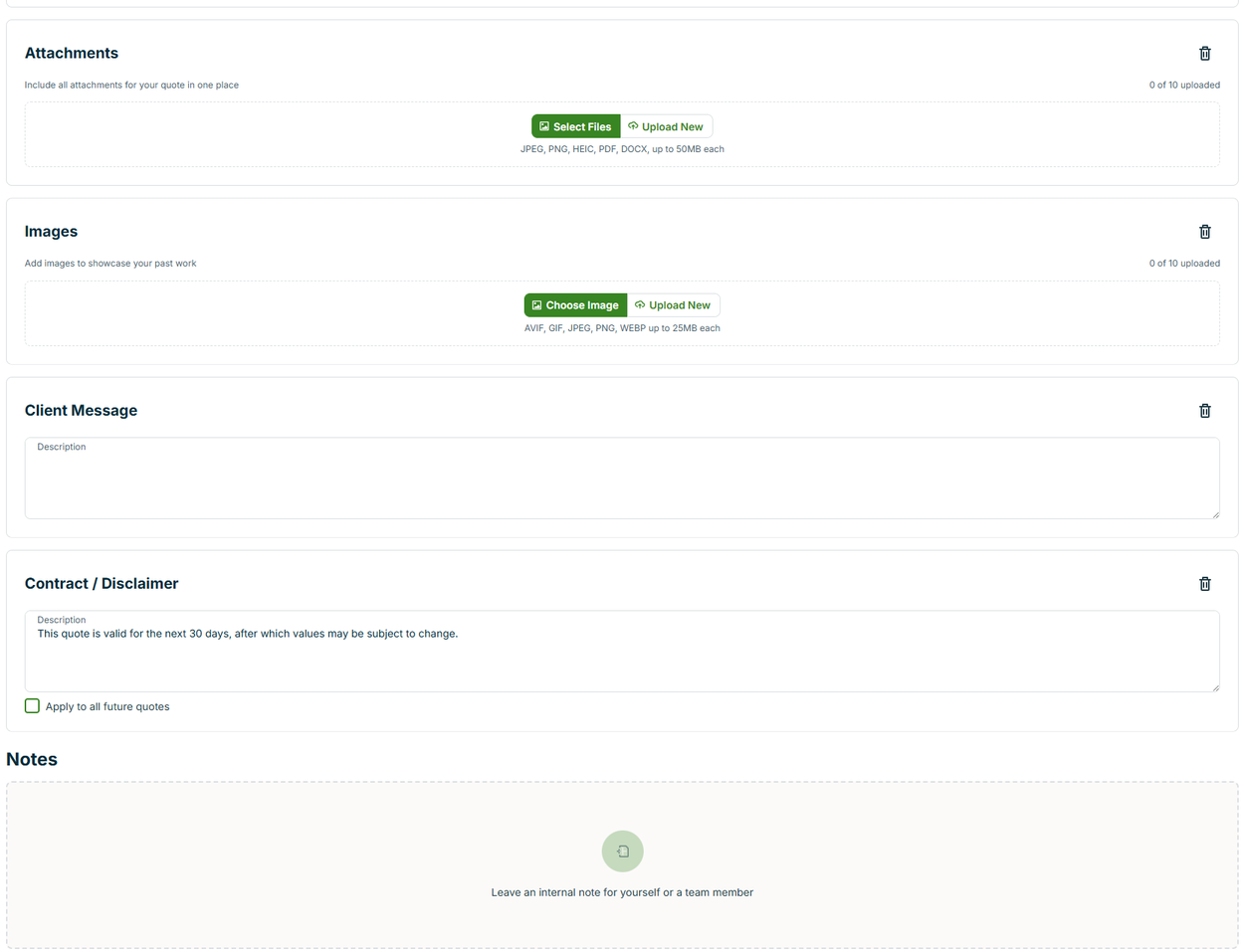
- A validity sentence. The Contract / Disclaimer block is pre-filled with "This quote is valid for the next 30 days, after which values may be subject to change." Editable, deletable, and honest about being only wording — nothing in the form stops a customer accepting an expired quote.
- An internal notes area. Labeled as notes for yourself or a team member, which marks it as the one part of the page the customer is not meant to read.
- An Apply to all future quotes checkbox under the disclaimer. Tick it once and your wording follows every quote you send after that, which is the right shape for a company that has a warranty or a limitation it always wants on paper.
And two blocks you add rather than get: Attachments and Images. They are separate for a reason — one is for documents, the other is described as the place to showcase your past work, and each caps at ten files.
Tax is configured from inside a quote
The totals column lists Subtotal, Discount, Tax and Total. Discount and Tax are links rather than fields — you add them. And because our fresh account had no tax rates in it, opening the tax row offered a dropdown reading No tax rate created with a single useful action behind it.
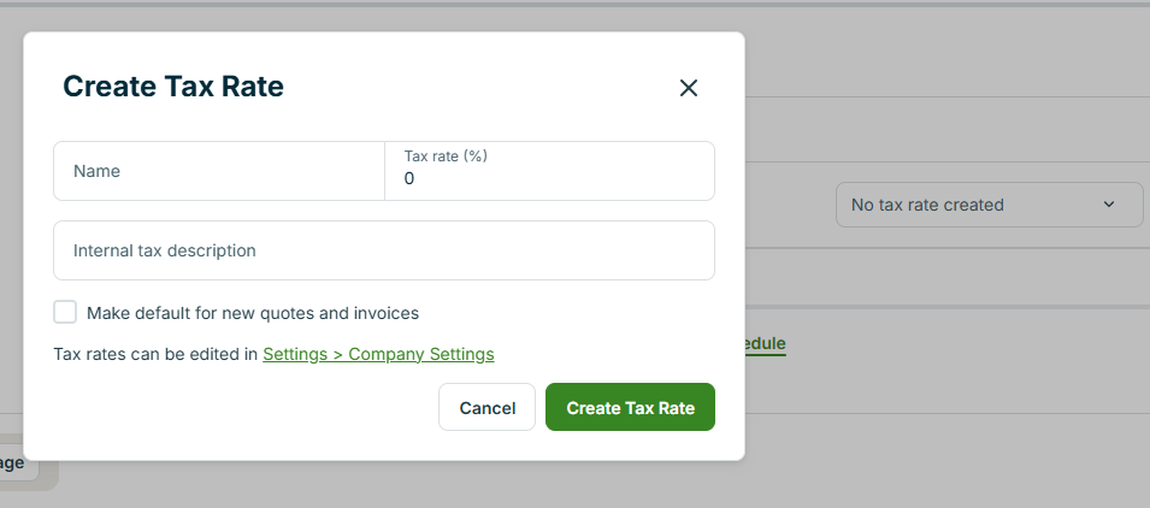
The pattern repeats: a name and a rate for the customer, plus an internal description for you. And the modal tells you where to go afterwards — Settings, Company Settings — which is a slightly odd place to learn about your own settings, but at least it tells you.
What is not on the form
For a pest company this is the part that decides whether the tool fits, so we went looking rather than assuming. Nothing on the quote screen asks for a product, an amount, a dilution ratio, an application site or an EPA registration number. A line item holds a name, a description, a quantity and a price. That is an invoice row, not an application record.
If a pest company wants a chemical record inside Jobber, the only route we found is a custom checklist attached to the job, which is a form somebody fills in on every visit rather than a library that remembers an EPA number for you. We built one and wrote up exactly what it can and cannot do.
What we could not verify: we did not build a deposit or payment schedule, did not send this quote to a customer, and did not accept one from the client side — so everything about how a quote arrives, looks and converts is outside this page. We did not use job costing with real cost values, and we did not test whether a quote converts into a job without re-entering the line items. The account is a free trial with fictional test data, and no money moved.
Frequently asked questions
Can I keep my cost and margin out of the client's copy of the quote?
Yes, and by design rather than by workaround. Unit cost and Markup live below the Unit price field, and the panel says those calculations won't be visible to your clients.
Does the quote expire after 30 days?
The form says it does. Nothing enforces it. The 30-day line is editable text in a block you can delete, so treat it as a statement you are making to the customer rather than a rule the software applies.
Can I attach photos to a quote?
Yes — a separate Images block, ten files, up to 25MB each. Attachments are a different block with its own limit of ten files at 50MB, for documents.
Can I take a deposit?
There is an Add Deposit or Payment Schedule link in the totals column, so the schedule attaches to the quote itself. We did not build one, so we cannot describe how it works.
Can a quote line be optional?
Yes. Every line item carries a Mark as optional checkbox, which is the mechanism for presenting a customer with a choice — take the recurring plan, add the exclusion work or don't.
Does Jobber record the pesticide on a quote?
No. There is no chemical, amount, dilution, site or EPA field on the form. Adding a product as a line item prices it for the customer; it does not record an application.
If you are here because you are choosing software: the quote form is the easy part of this decision. The harder part is that Jobber’s chemical record ships switched off and cannot be filled in from the phone, so for a pest company the paperwork waits for a desk. That finding, with the screenshots, is here, and the plan prices are on our Jobber pricing page. Jobber's own site is here.
If you have weighed the missing record and still want Jobber — some do, because the scheduling and the getting-paid side are the harder problems to solve — the trial signup is here. That is an affiliate link and we earn a commission if you become a paying customer. Going direct to Jobber instead skips that discount and pays us nothing.
Sources, and how to cite this page
Everything on this page was read from the New Quote screen, the tax rate modal, the margin panel and the optional blocks inside our own Jobber free-trial account on October 11, 2026. The account, the company and the customer records in it are fictional test data. The screenshots are ours. We did not send the quote, did not accept one as a customer, did not build a payment schedule and did not connect a payment processor, so no money moved. Jobber has not seen this page and has not paid us. Where a limitation is described as ours rather than the software's, it is because we could not reach that part of the product in a trial.
Cite this page: Wang, William. "Jobber quotes: every field on the form, and the margin your client never sees." Pest Software Hub, October 12, 2026. https://pestsoftwarehub.com/jobber-quotes
Corrections: if the quote form you see differs from this one, tell us and we will check it and publish the fix with the date.
Related reading
- Jobber for pest control — what the rest of the product does on a pest route
- Jobber pricing — which plan you have to be on to reach the quote tools
- GorillaDesk vs Jobber — quoting, invoicing and payment, side by side
- How to choose pest control software — what to look at before you build a quote