Jobber Chemical Tracking: where the record lives, and what it leaves out
Affiliate disclosure: some links on this site are affiliate links. If you sign up through one we may earn a commission, at no extra cost to you. It does not change what we recommend or how we rank it. Where a page carries an affiliate link, the link is labeled where it appears. Details here.
How this page is sourced, and one correction. Everything below comes from Jobber's own help center and its chemical-tracking feature page, read on October 23, 2026. We have not used the module ourselves: it was switched off throughout our October trial, which is precisely why we missed it. On October 16, 2026 we published that Jobber had no pesticide application record at all. That was wrong. This page replaces that claim, and the correction is dated here rather than edited away.
At a glance:
| Question | Answer |
|---|---|
| Does Jobber record pesticide applications? | Yes, through a module called Chemical Tracking. |
| Is it on by default? | No. It is switched off until you enable it under Settings, then Work Settings. |
| Can a technician fill it in from the app? | No. Jobber's help center says chemicals must be recorded from jobber.com. |
| Can you report on it? | Yes. A Chemicals report sorts by date, client or applicator and exports to CSV. |
| Which plans? | Listed as available on select plans. We have not confirmed which. |
It ships switched off, and that is the whole story
The switch is under Settings, then Work Settings. Turn it on and a Chemical Tracking section appears under Business Management with four parts: your company licensing details, a field for each employee's applicator license number, a Chemicals List, and Tank Mixtures that you define once and reuse.
That list is the part a paper form cannot do for you. A product is entered once and then picked from a list, so a technician is choosing a name rather than retyping an EPA registration number at every stop. It also means the spelling of a product is consistent across every record in the account, which is the difference between an export an inspector can read and one they cannot.
Where a record gets entered, and where it does not
An application is recorded from the client page: New, then Chemical Treatment. Jobber's documentation lists what the form holds: the service address, the job the application attaches to, the applicator, the date and time, the chemical and its concentration, further application details, and the weather conditions at the time.
The weather field is the one that suggests this was built for regulated work rather than for invoicing. In a jurisdiction that requires the conditions at application to be on file, that is a field you would otherwise be writing on paper.
Why we looked in the wrong place
Our October test treated the job as the unit of everything. We opened a visit, read its complete edit form, and found a title, instructions, a schedule, a team assignment and line items. No chemical field. We then searched the App Marketplace for pesticide, chemical and EPA, and got three zeroes. From those two observations we concluded the product had no way to record an application.
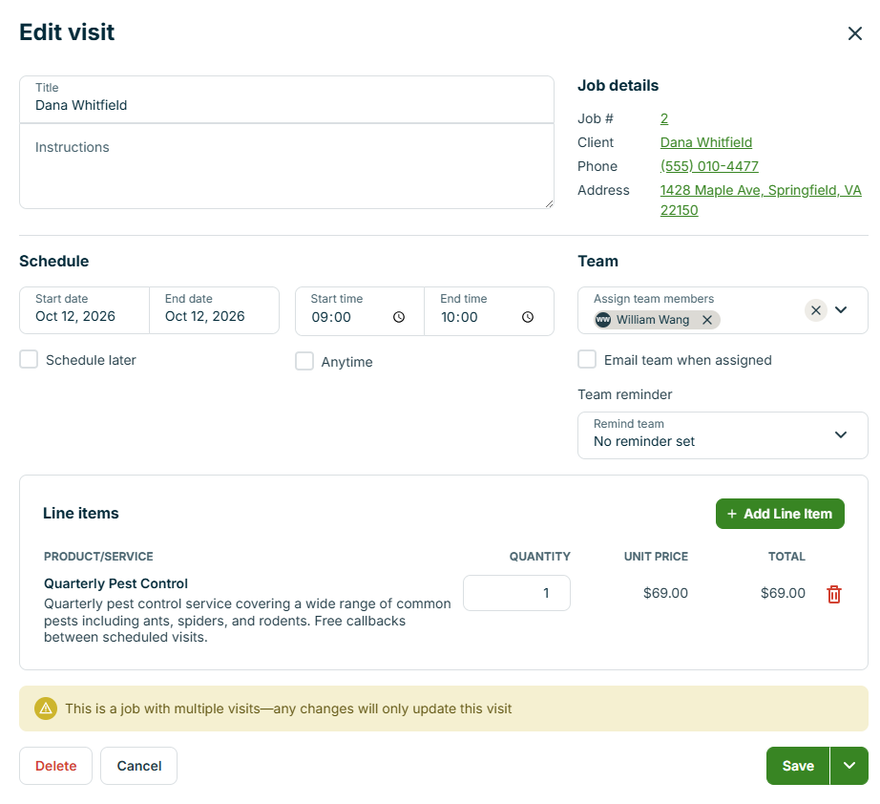
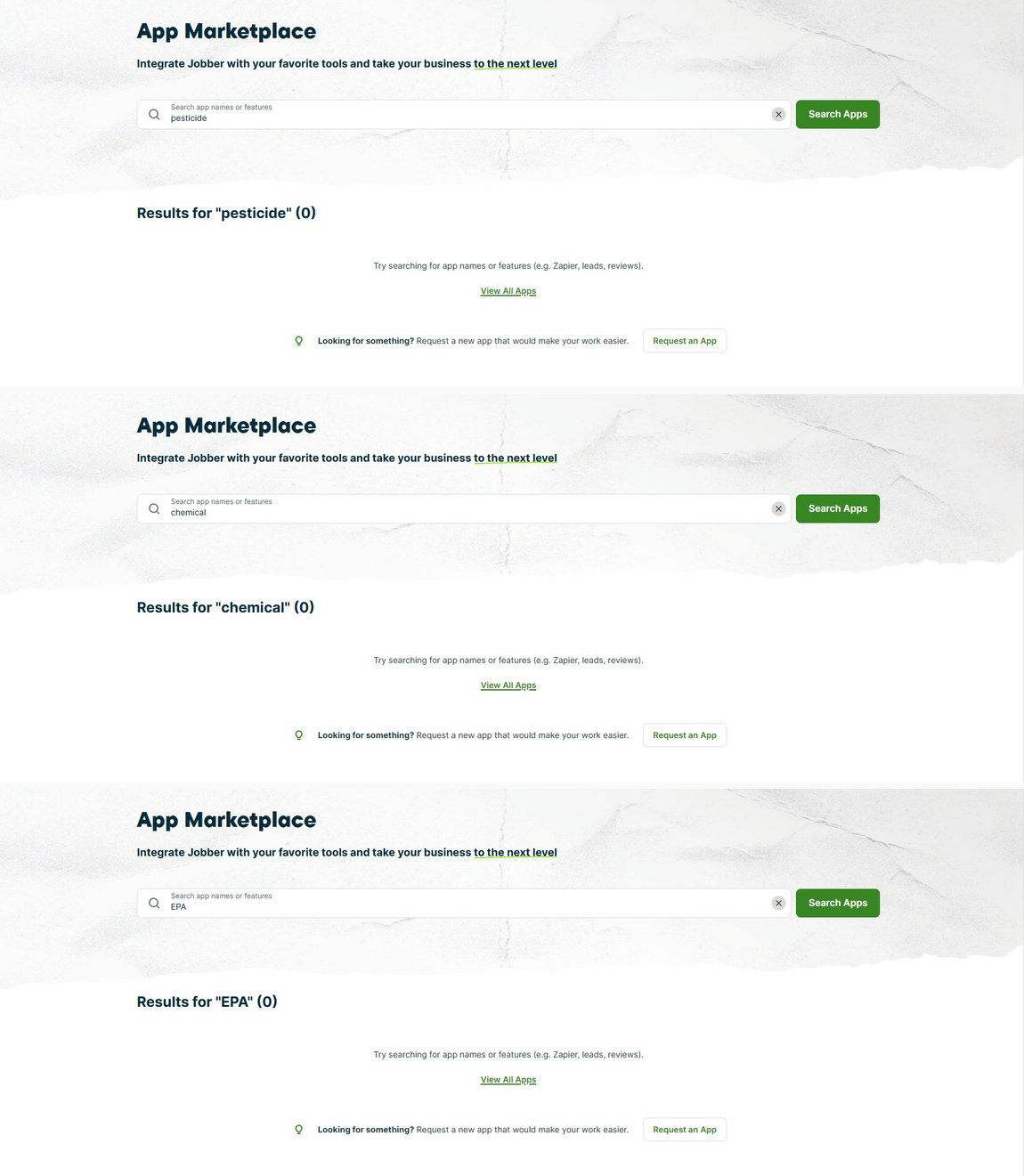
The lesson we have taken from it is narrow and we are applying it everywhere: a feature that is switched off in settings cannot be found by testing the screen a technician uses. We had already made the same mistake once, with ServiceM8's recurring jobs, which sat behind a disabled add-on. Twice is a pattern, so the standing rule now is that any claim of the form "this product does not have X" gets checked against the vendor's help documentation before it is published.
The report is the part worth paying for
Under Chemicals in the side navigation, Jobber lists every application in the account. Jobber's documentation says the list can be sorted by date, by client or by applicator, and that a Download action produces a CSV of your chemical applications.
That shape matters more than it looks. A CSV is queryable: you can filter it by product, total what you used across a season, or hand an inspector a date range. ServiceM8's route to the same paperwork is a Word document that becomes a PDF in the job diary, and a PDF cannot answer "how much Fipronil did we apply in the second quarter". GorillaDesk prints the EPA number on the customer's work order, so the client sees it, but the row itself carries no time of application and no technician name. Three shapes, and which one is right depends on whether your constraint is the inspector, the customer, or your own reporting.
The two limits that decide it for a small company
It cannot be recorded from the phone. Jobber's help center is explicit: there is no chemical tracking in the mobile app, and chemicals must be recorded from jobber.com. For a three-technician company that means the record is completed at a desk, after the visits, by somebody reading from memory or from a note. The record still exists and it is still defensible; it is just a second job rather than part of the first one.
It is listed as available on select plans. We have not confirmed which plans carry it, and we are not going to infer it from a comparison table we have not read. For a pest company this is the feature that decides the purchase, so it is worth getting in writing before you sign rather than discovering at the end of a trial.
What this means in practice. If your constraint is that the record exists, is searchable and can be exported, Jobber now meets it. If your constraint is that the person who applied the chemical is the person who records it, at the property, before the truck moves, then the deciding question is not whether a product has the field but whether the field is on the phone. That is a workflow question, and it is the one we would ask a sales team first.
What we have not verified
We have not switched Chemical Tracking on inside a Jobber account, so we have never seen the setup screen, the record form or the Chemicals report ourselves. Every description above is Jobber's, not ours. We do not know which plans include the feature, whether a record can be printed as a customer-facing document, what happens to existing records if the module is switched off again, or how the CSV is laid out. If we get back into an account, those are the first four things we will test, and this page will be re-dated when we do.
Frequently asked questions
Where is chemical tracking in Jobber?
Under Settings, then Work Settings, where a switch turns it on. Once on, a Chemical Tracking section appears under Business Management with company licensing details, a place for each applicator's license number, a Chemicals List and Tank Mixtures. Applications themselves are recorded from the client page, under New, then Chemical Treatment.
Can a technician record a chemical application from the Jobber app?
No. Jobber's help center states that there is no chemical tracking in the mobile app and that chemicals must be recorded from jobber.com. For a pest company that means the record is completed at a desk, after the visit, rather than at the property by the person who applied it.
What does a Jobber chemical record actually capture?
Jobber's documentation lists the service address, the job the application attaches to, the applicator, the date and time, the chemical name and its concentration, further application details, and the weather conditions at the time. The Chemicals List and Tank Mixtures are set up separately, so a product is picked rather than retyped.
Can I export Jobber's chemical records for an inspector?
Yes. The Chemicals report in the side navigation can be sorted by date, client or applicator, and it offers a CSV download of your chemical applications. That is a queryable export rather than a form, which is a different thing from a printable application certificate.
Which Jobber plans include chemical tracking?
Jobber's help center says chemical tracking is available on select plans and points to its pricing page for the current feature list. We have not confirmed which plans include it, and we are not going to guess. Ask support for the answer in writing before you sign, because it is the kind of feature that decides the purchase for a pest company.
If you want to check it yourself: the feature is documented at Jobber's help center, and the plan ladder is on our Jobber pricing page. Jobber's own signup is here — that is an affiliate link and we earn a commission if you become a paying customer. If you would rather go direct, Jobber's own site is here and pays us nothing.
Sources, and how to cite this page
Every functional description on this page comes from Jobber's help center article on Chemical Tracking and its chemical-tracking feature page, both read on October 23, 2026: the location of the switch, the contents of the Chemical Tracking section, the fields on the New Chemical Treatment form, the absence of chemical tracking in the mobile app, the CSV download from the Chemicals report, and the statement that the feature is available on select plans. The screenshot of the visit edit form and the App Marketplace searches are ours, captured in our own trial account on October 11, 2026. The comparison with GorillaDesk and ServiceM8 draws on our own tests of those products on October 8-9 and October 14-15, 2026. We have not used the module ourselves. Jobber has not seen this page and has not paid us; we do hold an affiliate relationship with Jobber, disclosed above.
Cite this page: Wang, William. "Jobber Chemical Tracking: where the record lives, and what it leaves out." Pest Software Hub, October 28, 2026. https://pestsoftwarehub.com/jobber-chemical-tracking
Corrections: this page exists because of one. We published on October 16, 2026 that Jobber had no pesticide application record, and corrected it on October 23, 2026. If you see something else here that does not match the product, tell us and we will check it and publish the fix with the date.
Related reading
- Jobber for pest control — the full scripted route, and what else Jobber does and does not do
- GorillaDesk pesticide record — the version that prints on the customer's work order
- ServiceM8 recurring jobs — the product with no native record at all
- The evidence page — every sourced finding, with dates and reproduction paths
- The three-way comparison of the record question — where each product keeps a pesticide application