ServiceM8 recurring jobs: the 4-week cap that blocks quarterly pest control
Affiliate disclosure: some links on this site are affiliate links. If you sign up through one we may earn a commission, at no extra cost to you. It does not change what we recommend or how we rank it. Where a page carries an affiliate link, the link is labeled where it appears. Details here.
This page is a walkthrough of ServiceM8's recurring-jobs setup, run inside our own 14-day trial account on October 14 and 15, 2026. We activated both recurring add-ons, built a job template, created a quarterly recurring job for a fictional client, printed all three customer documents, and searched the Form Store for a pesticide record. Every claim below has a screenshot or a PDF behind it.
At a glance:
| What we checked | What we found |
|---|---|
| Recurrence dropdown on a job card | Every Week → Every 4 Weeks. No quarterly. |
| Path to quarterly | Recurring Jobs + Reminders add-on (Starter plan badge) + job template + New Recurring Job button |
| $0 Free plan inside the product | Not reachable. Plan picker shows only 4 paid tiers. |
| Per-occurrence cost | Each activated recurring visit becomes a real job and consumes a job credit |
| Pesticide application record | Not natively. Form Store sells pest forms for $89–$129 each |
| Date format on customer documents | Two formats on the same job (Estimate: month-first; Work Order and Invoice: day-first) |
| Checklist on customer documents | Does not print |
The short version for a pest company owner: if you run quarterly contracts, ServiceM8 can schedule them, but you have to activate a paid add-on, build a template first, and use a booking flow that is separate from the one you see when you open a job. And if you need a pesticide application record — the paperwork your state technician or inspector asks about — there is no field for it anywhere in the product. You can buy a third-party form for $89–$129, build one yourself in Microsoft Word, or hire a ServiceM8 Partner to design it.
The $0 plan on the pricing page doesn't appear inside the product
ServiceM8's public pricing page lists five tiers. The first one is $0/mo — labeled Free, with 1 user and 30 jobs per month. The other four are Starter $29, Growing $79, Premium $149 and Premium Plus $349, each with unlimited users and a different job allowance.
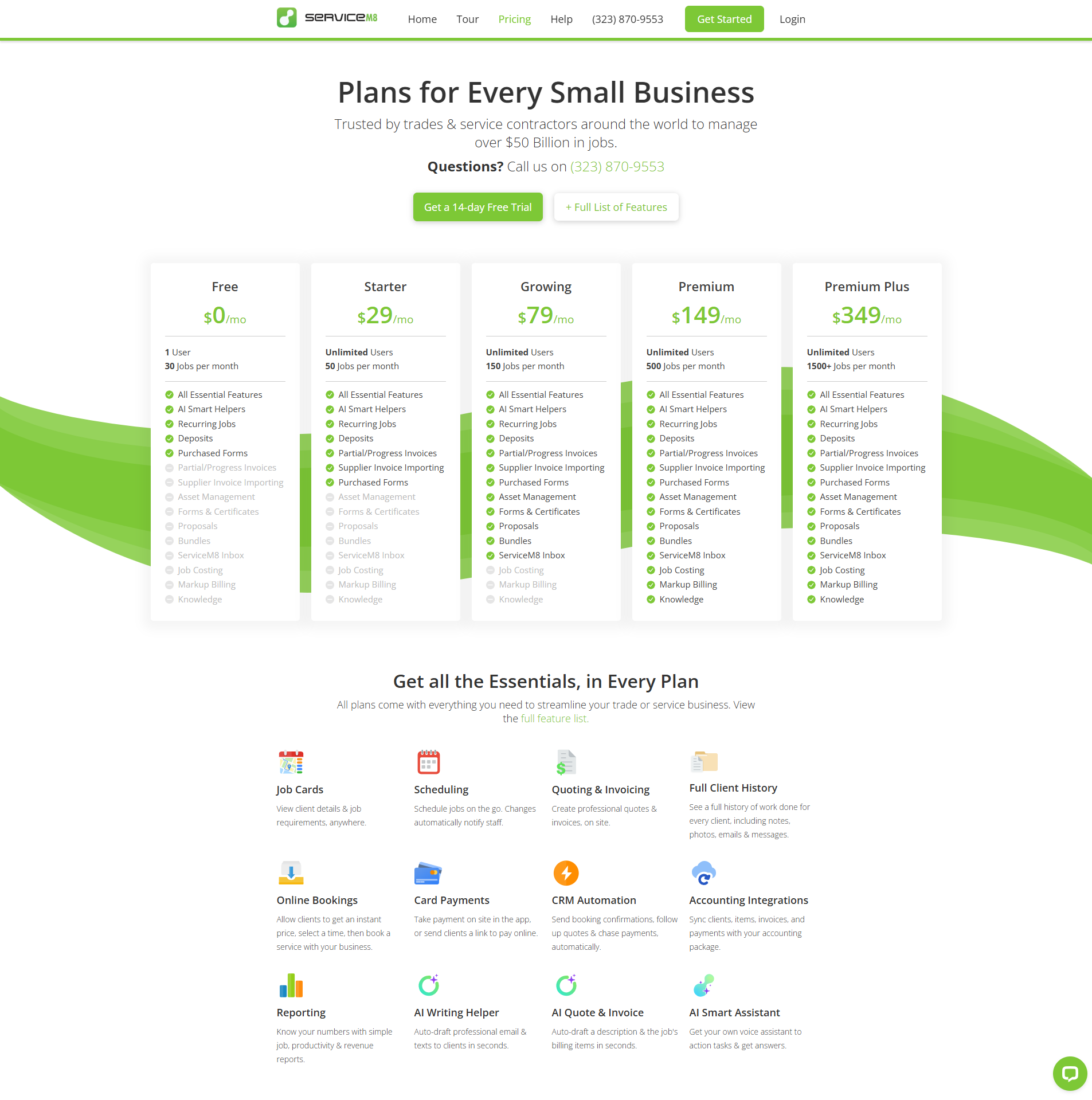
When we signed up for the 14-day free trial, we expected to land on that Free plan. We didn't. Our account page showed Current Plan: Trial - 14 days remaining with No active subscription and Credit/Debit Card: None. When we clicked Choose Plan, the picker that opened listed only the four paid tiers — no Free option anywhere on that screen.
Two things about the Free tier are worth knowing before you rule it out. ServiceM8's FAQ describes it as "completely free for solo operators" — which matches the 1-user limit — and adds that you can "earn unlimited bonus jobs by simply accepting card payments." Our trial never sat on the Free tier, so we have not verified how that bonus-jobs mechanism works month to month.
ServiceM8 is an Australian company, and the pricing page says "Prices are in USD." The product pages we reached are consistent with that. But the gap between a plan that is advertised on the marketing site and a plan that cannot be reached inside the product is the kind of thing that costs a new customer time to figure out.
The recurrence dropdown on a job card caps at every 4 weeks
Open any job in ServiceM8 and you'll see a toolbar with a Recurrence button. We clicked it. The dropdown that opened had exactly five options:
None · Every Week · Every 2 Weeks · Every 3 Weeks · Every 4 Weeks
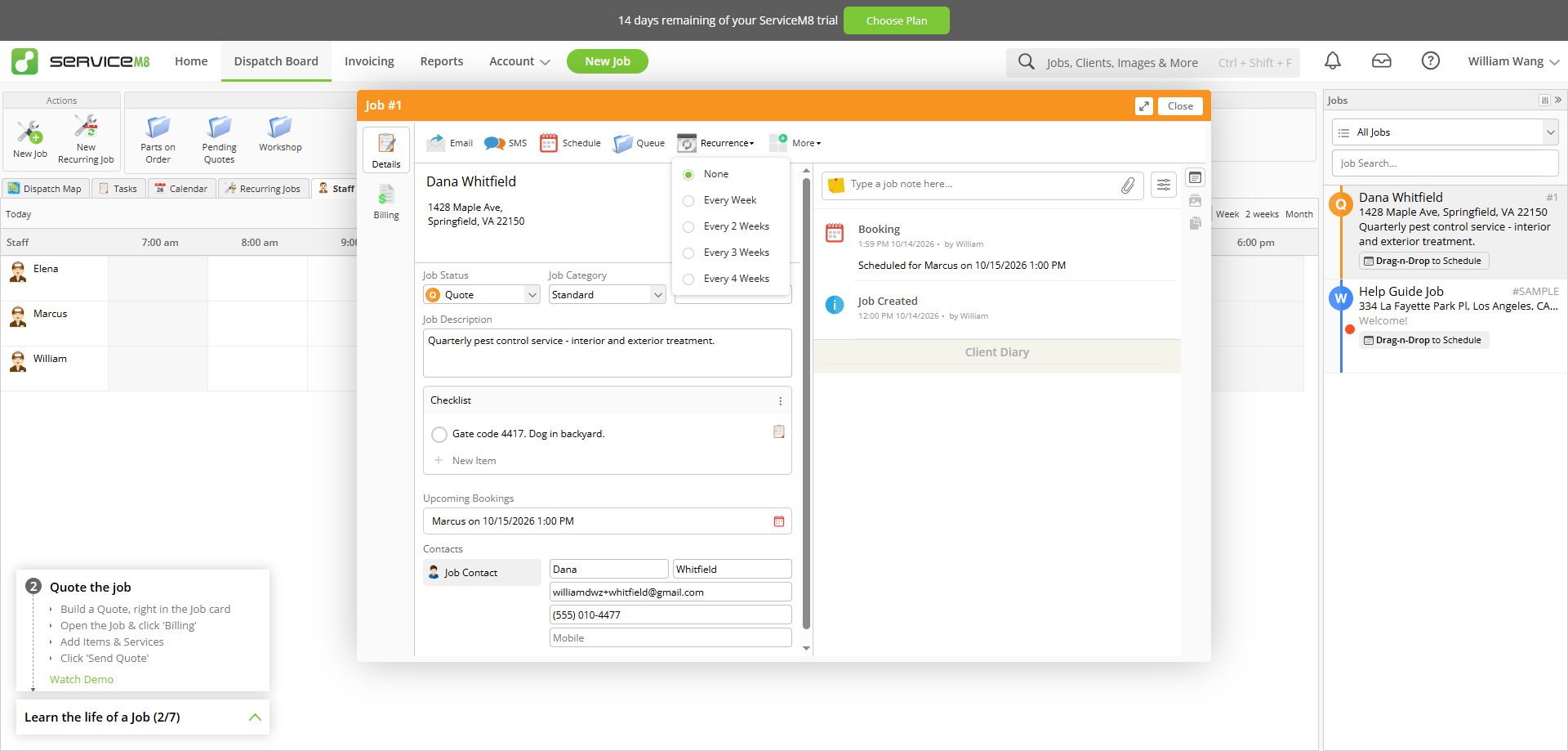
That dropdown is provided by the Simple Recurring Jobs add-on, which is free and activated by default. ServiceM8's own description of it reads: "This system works great for cleaning, pool and lawn industries with basic repeat scheduling requirements." The description does not mention pest control, and the 4-week ceiling explains why: quarterly contracts are the backbone of residential pest management, and a 4-week cap cannot express them.
When a job's status is set to Completed, the Simple Recurring Jobs add-on creates a duplicate at the set interval, scheduled to the same staff member at the same time. The mechanism works — but the longest interval it supports is four weeks, and that is not how quarterly pest routes are built.
Getting to quarterly requires three steps
Step 1: activate the Recurring Jobs + Reminders add-on
Go to Settings → ServiceM8 Add-ons and activate Recurring Jobs + Reminders. The badge on this add-on says Starter Plan, which means it requires the Starter tier ($29/month) or above. The activation itself was instant and free on our trial — no card, no upgrade prompt.
Step 2: build a job template
The advanced recurring flow requires a Job Template — a pre-filled job card with a description, checklist and line items. Templates live at Settings → Job Templates. We built one called Quarterly Pest Control with a six-item checklist and a $69 line item. Once saved, the template appeared in the template list and became selectable in the New Recurring Job flow.
Step 3: use the New Recurring Job button on the dispatch board
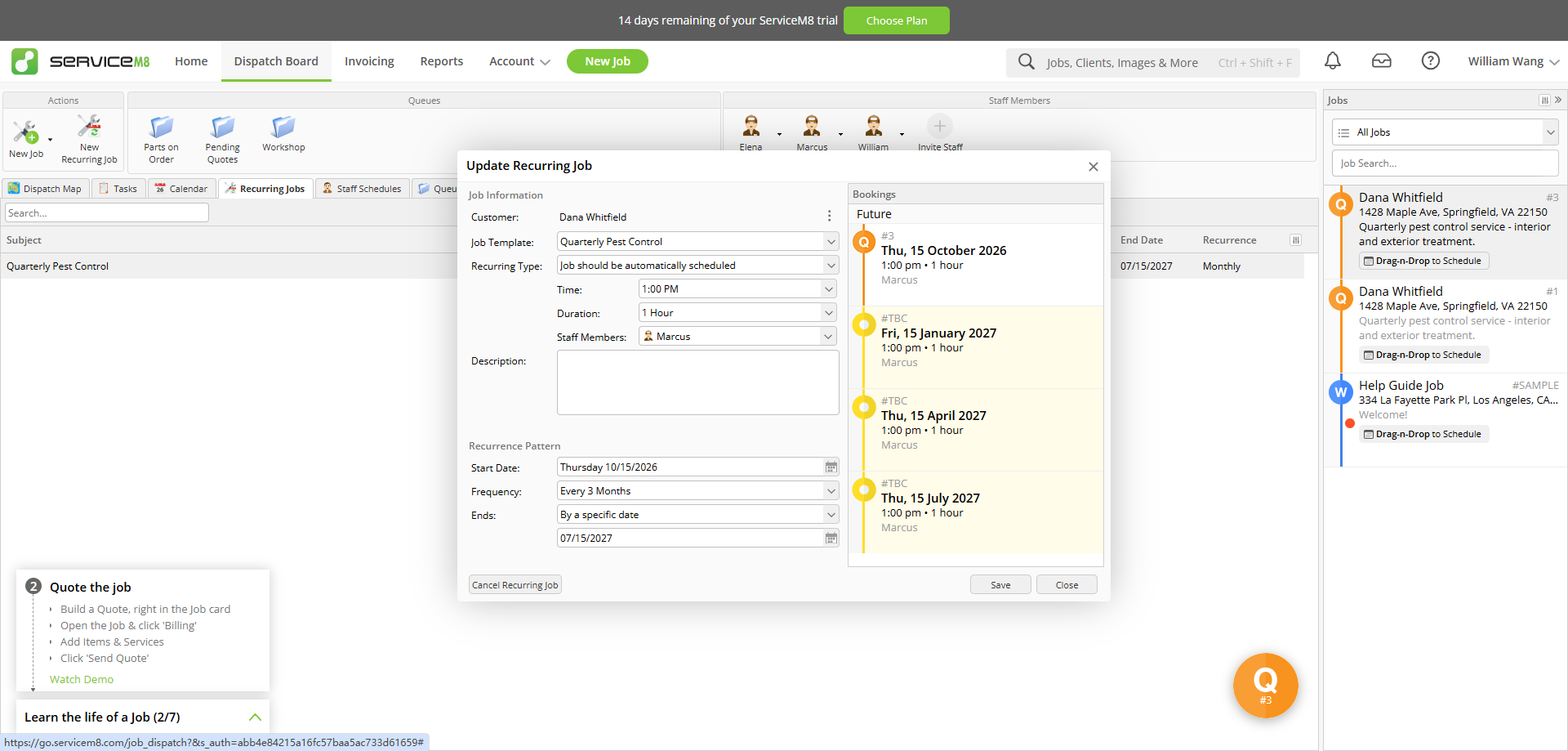
After the add-on is active, a New Recurring Job button appears on the left side of the dispatch board. This opens a separate booking flow — not the same recurrence dropdown from the job card. This flow offers Every 3 Months, Every 6 Months, Every 12 Months and Every 24 Months as standard options, plus a custom pattern builder for anything else.
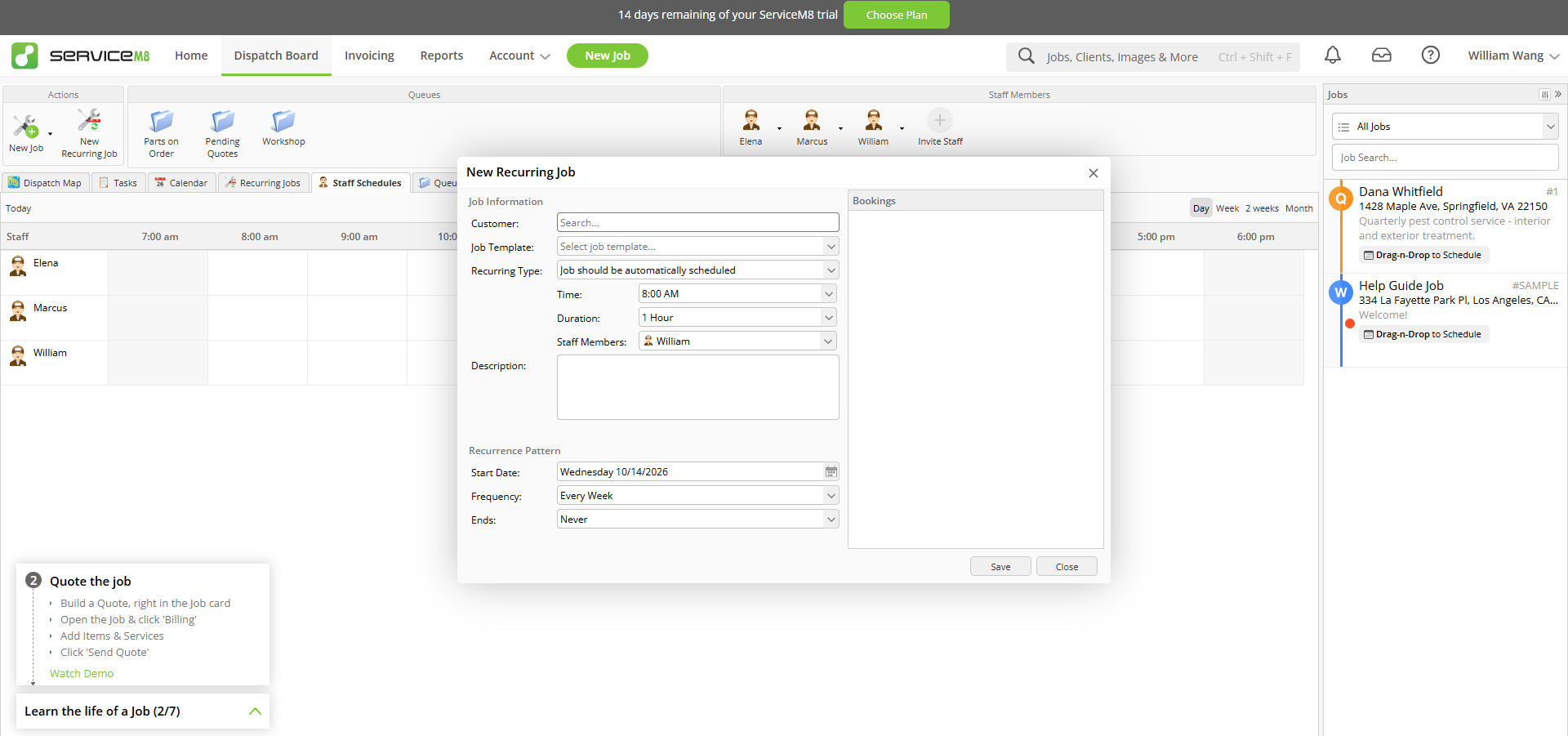
We set the frequency to Every 3 Months, set a start date of October 15, 2026, and set the end condition to After a set number of recurrences at 4. The Bookings panel on the right updated in real time to show four future dates: October 15 2026, January 15 2027, April 15 2027 and July 15 2027 — always on the 15th, not always on the same weekday. The system locks to the day of the month, not the day of the week.
When we saved, the booking nearest to today (October 15, one day away) activated immediately and became a real job — Job #3 — assigned to our test technician Marcus Webb. The other three bookings stayed as yellow TBC placeholders in the Bookings panel. ServiceM8's documentation explains that TBC bookings are converted to real jobs 7 days before the scheduled date by default, and this window is adjustable in Settings → Preferences → Recurring Jobs.
Each occurrence consumes a job credit
ServiceM8's plans are metered by jobs, not by users. When we asked what that means for recurring work, the answer came from ServiceM8's own activation email: "any jobs booked using the add-ons will incur standard per-job fees. Recurring jobs are only charged the week they are 'activated'." Our own test confirmed the mechanism: the activated booking became a real job with a number; the TBC bookings did not.
Here is why that matters for a pest company. A three-technician company running 200 accounts on quarterly contracts generates roughly 67 visits a month — each one a separate job card. ServiceM8's Starter plan includes 50 jobs per month, which falls short by about 17. The Growing plan at $79/month includes 150 jobs, which covers it with room to spare.
All four paid tiers include unlimited users. The job allowance is the number that moves first: 50, 150, 500 or 1,500 per month. ServiceM8's FAQ describes what happens if you run over: you can keep creating jobs for another 7 days, and if your monthly plan resets inside that window your job credits reset with it. If it doesn't, you are prompted to upgrade.
But the feature lists are not identical across tiers, and that matters more than the job count for some buyers. Forms & Certificates, Asset Management and Proposals are listed as available from Growing ($79) and above. Job Costing, Markup Billing and Knowledge start at Premium ($149). On the Free tier only five features are ticked: All Essential Features, AI Smart Helpers, Recurring Jobs, Deposits and Purchased Forms.
| Plan | Monthly | Jobs per month | Users | Features that unlock here |
|---|---|---|---|---|
| Starter | $29 | 50 | Unlimited | Partial/Progress Invoices |
| Growing | $79 | 150 | Unlimited | Asset Management, Forms & Certificates, Proposals, Bundles, ServiceM8 Inbox |
| Premium | $149 | 500 | Unlimited | Job Costing, Markup Billing, Knowledge |
| Premium Plus | $349 | 1,500+ | Unlimited | Everything listed above |
There is no pesticide application record
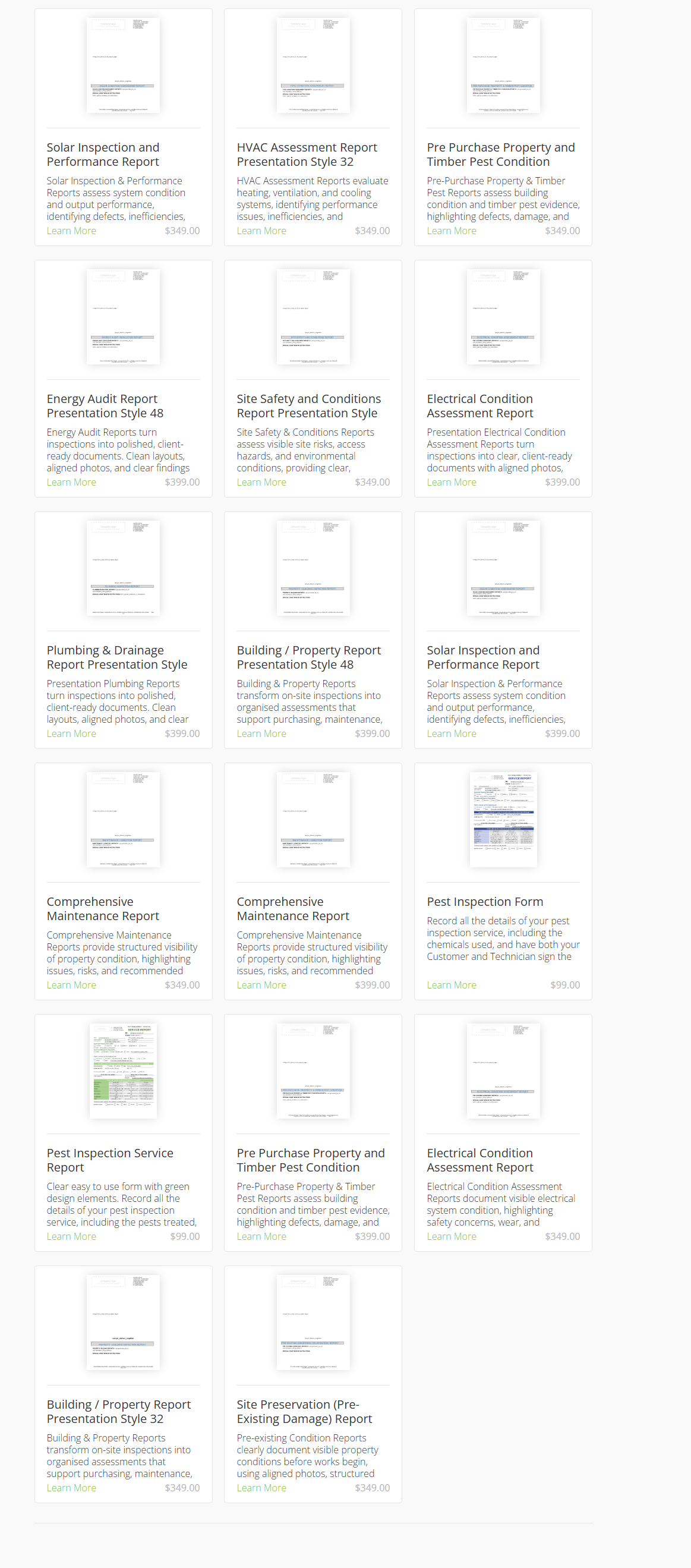
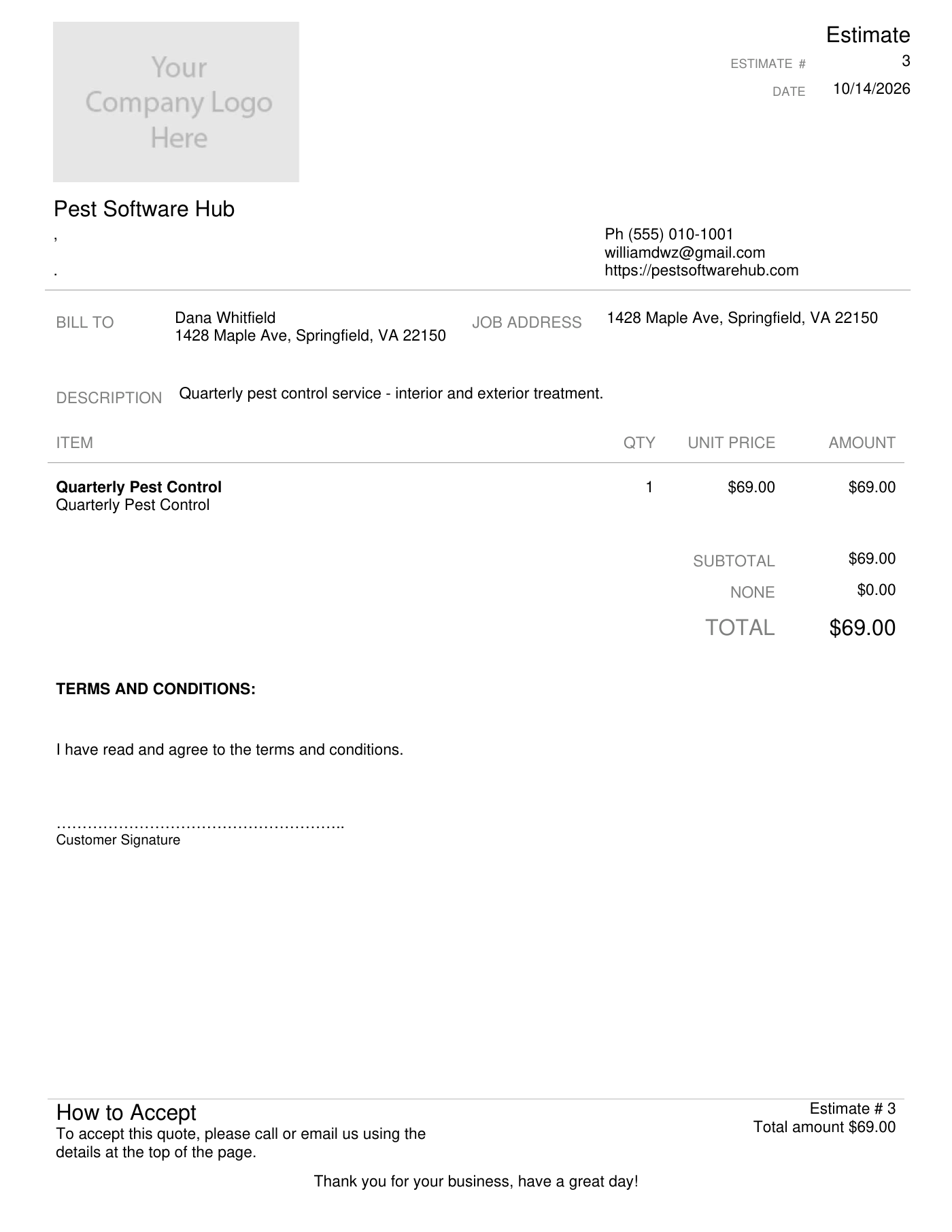
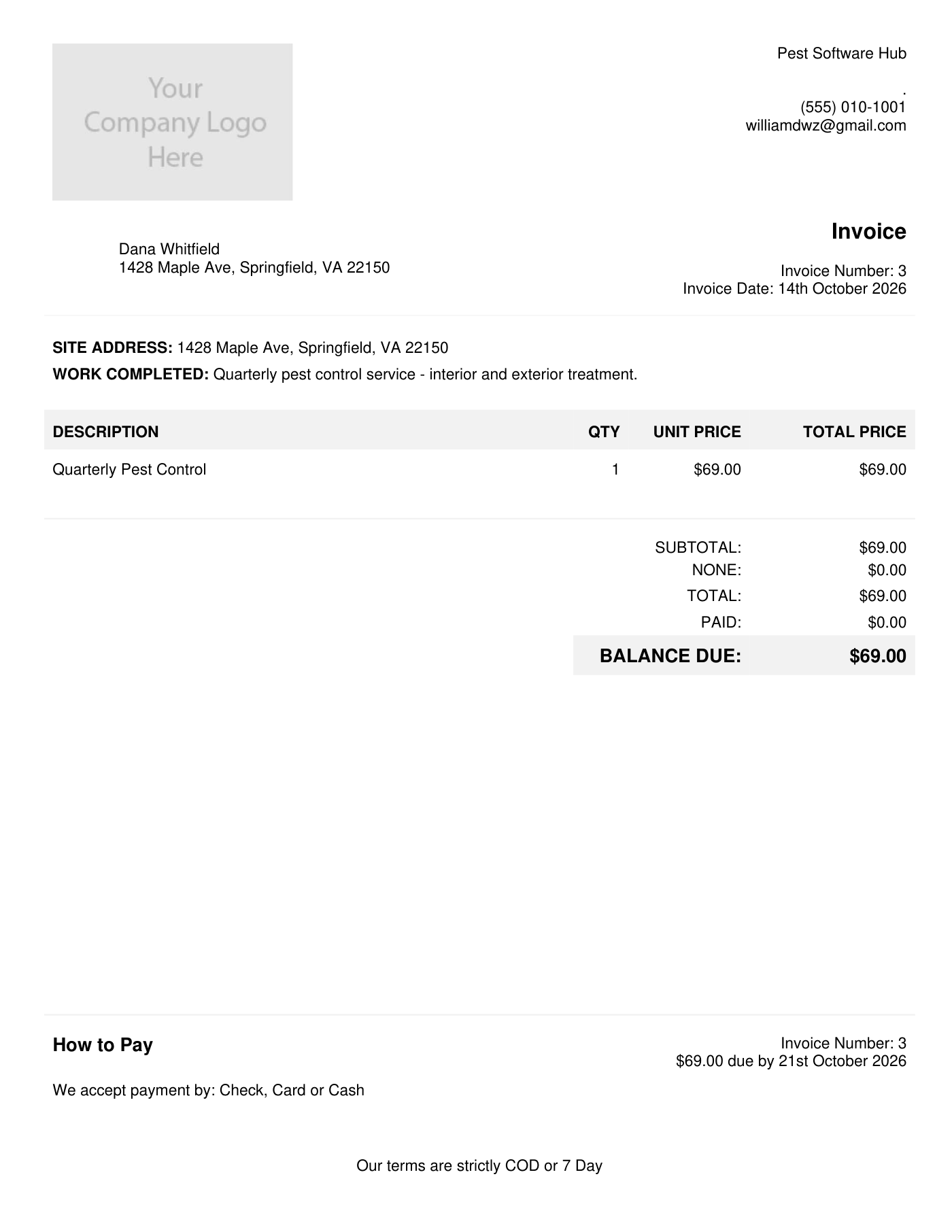
We printed all three customer documents from the same job — a Work Order, an Estimate and an Invoice — and read every field on every page. None of them contains a chemical name, an EPA registration number, a dilution ratio, an application amount or a target pest field. The Materials table on the Work Order lists only the service line item (the $69 Quarterly Pest Control entry) with a quantity and a unit price. The Work Completed section on both the Work Order and the Invoice was pre-filled with the job description text, not with anything a technician typed after doing the work.
The checklist we built inside the job — six steps including Record product used, dilution and EPA number — does not appear on any of the three printed documents.
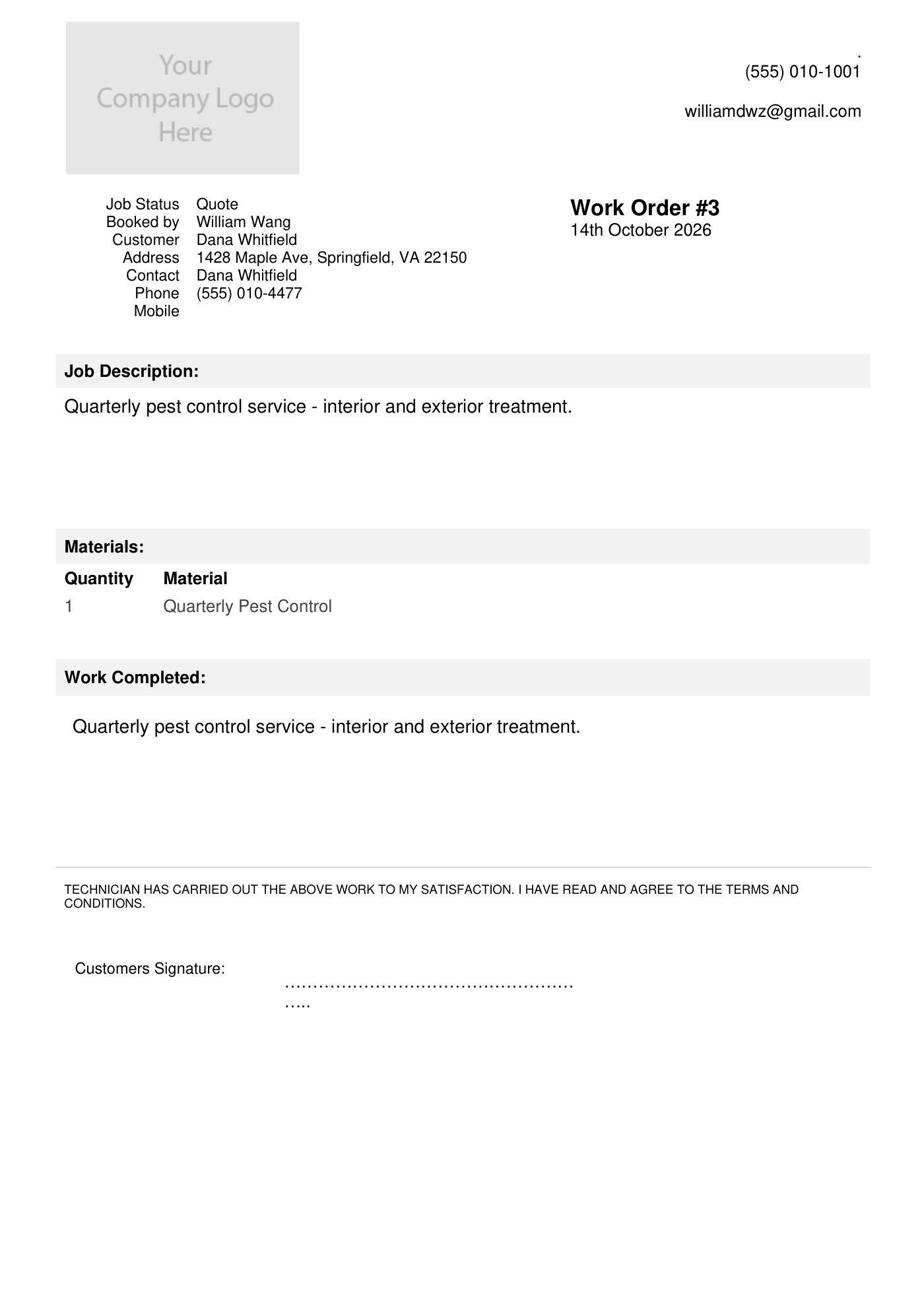
ServiceM8's Forms add-on (free) lets you create custom forms, and the built-in Form Store sells pre-built documents. We searched the Pest Control category: six forms are available, priced from $89 to $129 each. Searching the word pesticide returns no results. The closest match — a form titled Pest Inspection Form ($99) — describes recording "the chemicals used" on an inspection, not a treatment application record.
The plan gating on forms is easy to misread, and ServiceM8's FAQ spells it out: buying and using a form from the Form Store works on every plan, including Free. Building your own form, or paying a ServiceM8 Partner to build one, requires Growing or higher. The FAQ puts it this way: "If you want to build your own Forms, or engage a ServiceM8 Partner to create custom Forms for you, you'll want the Growing plan (or higher)."
Forms themselves are built in Microsoft Word and uploaded to ServiceM8. When a technician completes one in the field, the result is saved as a PDF in the job diary. The PDF is a document — it cannot be queried, sorted or aggregated the way a native database field can. If you need to answer "which accounts used which product last quarter," a PDF archive does not give you that answer without opening each file.
For comparison, GorillaDesk includes a native pesticide application record as a standard feature on its cheapest tier. The record includes fields for the product name, EPA registration number, dilution rate and application amount, and the EPA number prints on the exported work order PDF at no extra charge.
Three customer documents, two date formats
We printed the Work Order, the Estimate and the Invoice from the same job on the same day and compared them side by side. Two things stood out.
Two date formats on the same job. The Estimate opens with DATE 10/14/2026 — month-first, the US convention. The Work Order and the Invoice both open with 14th October 2026 — day-first with an ordinal suffix, the Australian and British convention. ServiceM8 is built by an Australian company, and the day-first format carries through to two of the three documents an American customer will receive.
Work Completed is pre-filled with the job description. The Work Order and the Invoice both contain a Work Completed section. In our test, that section contained exactly the same text as the job description — the sentence we typed when we created the template, before anyone went to the property. A customer receiving this document would read that the work was carried out. We had not sent a technician.
| Work Order | Estimate | Invoice | |
|---|---|---|---|
| Title | Work Order #3 | Estimate #3 | Invoice |
| Date format | 14th October 2026 | 10/14/2026 | 14th October 2026 |
| Address label | Address | Bill To + Job Address | Site Address |
| Customer signature | Yes | Yes | No |
| Amount | No | Yes | Yes + Paid + Balance Due |
| Payment terms | — | Call or email to accept | Check, Card or Cash; COD or 7 Day |
| ServiceM8 logo | Yes | No | No |
| Checklist | Does not print | Does not print | Does not print |
| Chemical or EPA field | None | None | None |
What's turned on when you start
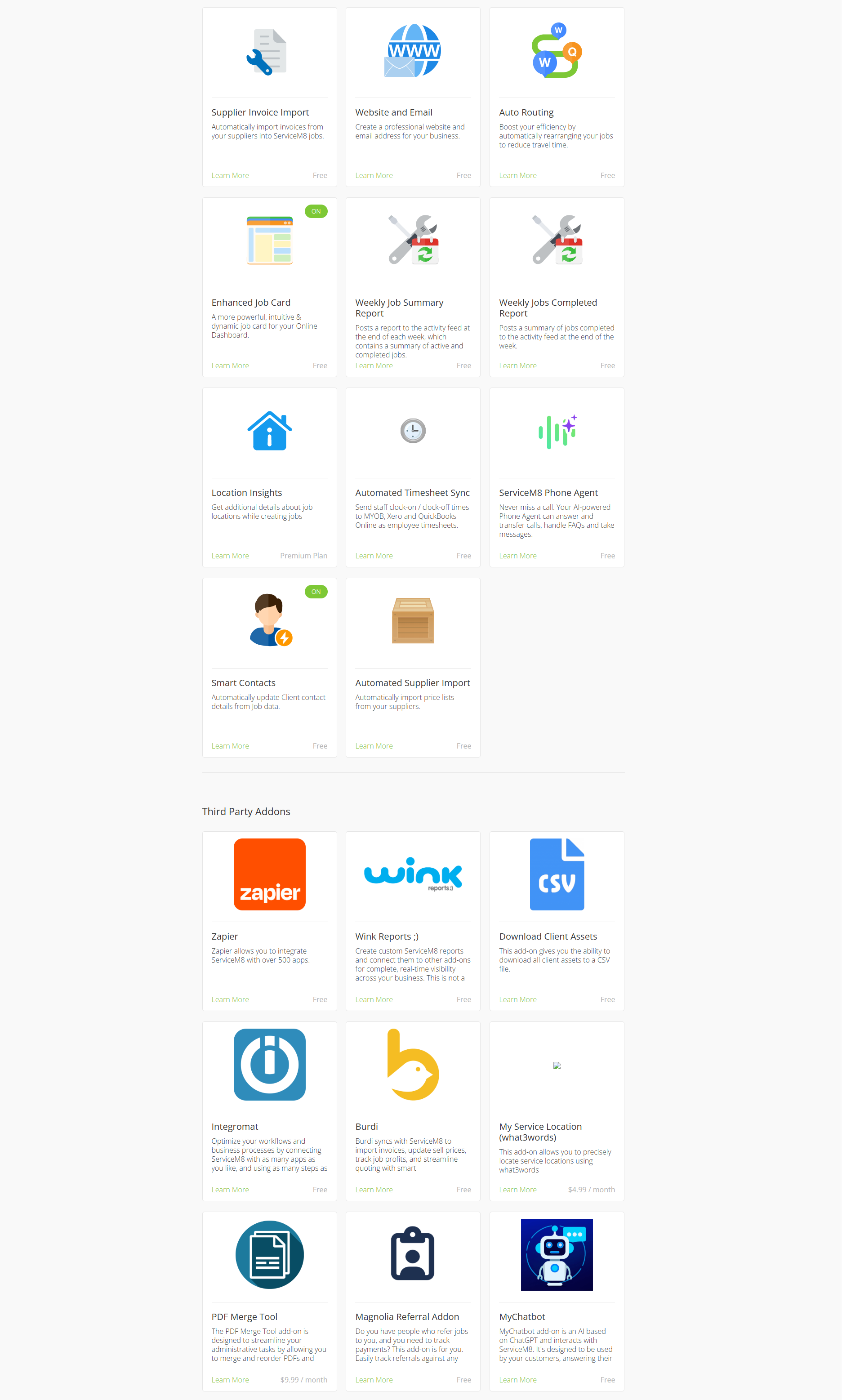
A new ServiceM8 trial account arrives with three add-ons already activated: Track My Arrival (sends customers an SMS when a technician is en route), Enhanced Job Card (a redesigned job view) and Smart Contacts (automatically updates client contact details from data entered on the job). None of these asked for confirmation before turning on.
The Smart Contacts behavior is worth understanding: if a technician enters a different phone number or email address on a job card than what is saved on the client record, ServiceM8 can overwrite the client's stored details with the job data. That is useful if the old number was wrong. It is less useful if the technician simply typed a one-off number for this visit.
A new account also arrives with a sample job — Help Guide Job, assigned to the account owner's calendar at 8:00 pm on a Saturday — and four sample forms (Authority to Proceed, Contract Variation, Job Safety Analysis and Vehicle Safety Maintenance Check). None of these are pest-specific.
What we could not test
Our trial account never named a tier. The Account page showed only Trial - 14 days remaining, with no subscription and no card on file. ServiceM8's FAQ explains why that did not block us: "You'll get full access to all features during your free trial." Because we were on a trial rather than a named plan, we cannot tell you from first-hand experience what changes when the trial converts. Every feature-to-tier mapping in this article comes from ServiceM8's public pricing page, captured on October 15, 2026.
We did not test the mobile app (iOS or Android). We did not connect a payment processor, so we did not process a real payment or test the payment-on-job flow. We did not test ServiceM8 Phone, the SMS templates, the MailChimp integration or the Zapier integration. We did not test the AI Smart Helpers features. We did not measure how long support takes to respond.
Which version this page describes
Every screen described here was captured on October 14 and 15, 2026. During our trial, ServiceM8 began rolling out a new dashboard release under the name ServiceM8 15 — the account showed a banner offering to activate the new features, with an automatic update otherwise. We did not activate it, so this page documents the dashboard as it stood before that rollout reached us. If you are reading this later and a screen does not match, that is likely why: tell us and we will re-test and re-date the page.
How we tested
Every finding on this page was observed inside our own ServiceM8 14-day trial account, which we created on October 14, 2026 with no credit card. The company name, the client records, the staff names, the addresses, the phone numbers and the service items in the account are fictional test data built to match a three-technician residential pest control company running quarterly contracts on roughly 200 accounts. The screenshots and the PDF exports are ours. ServiceM8 has not seen this page and has not paid us.
We activated the Simple Recurring Jobs add-on and the Recurring Jobs + Reminders add-on, built a job template called Quarterly Pest Control, created a recurring job for a fictional client, activated the nearest booking, and printed the Work Order, Estimate and Invoice as PDFs. We also searched the Form Store for pest, chemical and pesticide, and read every result in the Pest Control category.
Where a limitation is described as ours rather than the software's, it is because we could not reach that part of the product or chose not to connect something in a trial.
Frequently asked questions
What is included in the free Simple Recurring Jobs add-on?
It’s a free add-on that adds a Recurrence button to each job card with four interval options: every week, 2 weeks, 3 weeks or 4 weeks. When a job is marked Completed, ServiceM8 creates a duplicate at the set interval. It cannot schedule quarterly or longer intervals.
Does ServiceM8 have a free plan?
The pricing page lists one: $0/mo, 1 user, 30 jobs per month. We could not reach it inside the product. When we clicked Choose Plan from our trial account, the picker showed only four paid tiers starting at $29. Our account page said Trial with no subscription. We are not saying the free plan doesn't exist — we are saying we could not find the entry point for it on the path we took.
Can ServiceM8 schedule quarterly recurring jobs?
Yes, but not from the Recurrence button on a job card. That button caps at every 4 weeks. To schedule every 3 months, you need to activate the Recurring Jobs + Reminders add-on, build a job template first, and then use the New Recurring Job button on the dispatch board. The advanced flow supports every 3, 6, 12 or 24 months as standard options.
Does each recurring visit use up a job credit?
Yes. ServiceM8's own activation email states that any jobs booked using the recurring add-ons will incur standard per-job fees. In our test, the nearest booking activated immediately and became a real job with a job number. Future bookings stayed as yellow TBC placeholders until 7 days before the date, at which point they would do the same.
Does ServiceM8 have a pesticide application record?
Not natively. We printed the Work Order, the Estimate and the Invoice from our test job and none of them contains a chemical, EPA, dilution or application field. The checklist we built inside the job does not print on any customer document. ServiceM8's Forms add-on lets you build forms in Microsoft Word, and the Form Store sells six pest-control forms priced from $89 to $129 each. A completed form becomes a PDF in the job diary — a document you can email, not a record you can query.
What date format does ServiceM8 use on customer documents?
Two different formats on the same job. The Estimate uses 10/14/2026. The Work Order and the Invoice both use 14th October 2026. We are not sure whether this is configurable; we did not find a date-format setting during our test.
How much does ServiceM8 cost for a small pest control company?
For a three-technician company running roughly 67 jobs a month, Growing at $79/month is the tier that fits. Starter's 50 jobs/month falls short. All four paid tiers include unlimited users. The job allowance is not the only difference between tiers — Forms & Certificates, Asset Management and Proposals start at Growing, and Job Costing, Markup Billing and Knowledge start at Premium.
What is the Simple Recurring Jobs add-on?
It's a free add-on that adds a Recurrence button to each job card with four interval options: every week, 2 weeks, 3 weeks or 4 weeks. When a job is marked Completed, ServiceM8 creates a duplicate at the set interval. ServiceM8's description says it works well for cleaning, pool and lawn industries. It cannot schedule quarterly or longer intervals.
What ServiceM8 does well, and who it fits
The things ServiceM8 handled without friction in our test: the signup took under a minute with no credit card, staff invitations went through without an upgrade wall, the client record natively separates a company name from a contact person (which matters for commercial accounts), and the Queue feature for parking jobs that are waiting on parts or client confirmation is a real operational tool that most competing products don't have at this price.
Three things from ServiceM8's own FAQ that matter to a small company, and that we did not need to test because the vendor states them in writing: support is described as "24/7 chat & email support"; there is no lock-in, and you can upgrade or downgrade at any time with credit from the previous plan applied pro-rata; and progressing through the Learning Roadmap can unlock higher job and SMS limits without changing plans.
ServiceM8's pricing page puts Pest Control first in its Form Store Industries list. The company clearly knows this vertical exists. The question our test answers is narrower: for a small pest company that needs quarterly recurring routes and a pesticide application record, how much of that is built in and how much has to be assembled? The answer, from our account, is: the recurrence is behind a paid add-on and a template step, and the record has to be bought or built.
If you want to try ServiceM8 yourself: the 14-day trial requires no credit card — we signed up without one and our account page still shows no payment method on file. The signup page is here. If you'd rather read their pricing first, their pricing page is here. We are not a ServiceM8 affiliate at the time of writing; this page carries no affiliate link for ServiceM8.
Sources, and how to cite this page
Everything on this page was read from screens inside our own ServiceM8 14-day trial account on October 14–15, 2026, and from ServiceM8's public pricing page and Form Store, which we accessed through the account. The company name, the client records, the staff names, the addresses, the phone numbers, the service items and the checklists in the account are fictional test data built to match a three-technician residential pest control company running quarterly contracts on roughly 200 accounts. The screenshots and the PDF exports are ours. We did not process a payment, connect a payment processor, install the mobile app or contact ServiceM8 support, so those areas are described as untested rather than tested-and-passed. ServiceM8 has not seen this page and has not paid us. The commission-rate discrepancy between ServiceM8's partner agreement (20% for 12 months) and the rate shown in the PartnerStack dashboard (60% on monthly plans, up to $450 on annual plans, $5 per trial signup) was noted on October 14, 2026 and has not been resolved; we describe both numbers rather than choosing one.
Cite this page: Wang, William. "ServiceM8 recurring jobs: the 4-week cap that blocks quarterly pest control." Pest Software Hub, October 15, 2026. https://pestsoftwarehub.com/servicem8-quarterly-recurring-jobs
Corrections: if the ServiceM8 screens you see differ from the ones described here, tell us and we will check it and publish the fix with the date.
Related reading
- ServiceM8 pricing — five job-credit tiers and what each one unlocks
- ServiceM8 review — the whole scripted route, and what it did not do
- How the other two handle recurring work — the same question asked of Jobber and GorillaDesk
- Pest control software pricing — six vendors, six different billing models, side by side
- Jobber for pest control — what Jobber does on the same scripted route
- GorillaDesk pesticide record — the native application record ServiceM8 doesn't have
- How to choose pest control software — what to look at before you pick