ServiceM8 review: what a 14-day trial showed, and what it did not
Affiliate disclosure: some links on this site are affiliate links. If you sign up through one we may earn a commission, at no extra cost to you. It does not change what we recommend or how we rank it. Where a page carries an affiliate link, the link is labeled where it appears. Details here.
We ran one scripted route through ServiceM8 on October 14 and 15, 2026: a three-technician residential company, about 200 accounts on quarterly contracts, one commercial building, one quarterly recurring job, a quote, an invoice, a payment record and a dispatched visit. The same script, with the same fictional customer data, was run through GorillaDesk and Jobber. This page is what ServiceM8 did with it.
At a glance:
| Question | Answer |
|---|---|
| Best for | A 1-5 technician company that wants unlimited users and a bill that does not move when it hires |
| Least suited to | Anyone whose paperwork includes a pesticide application record, or who needs quarterly recurring routes working out of the box |
| Bill for 200 quarterly accounts | $79 a month on Growing, unlimited users, roughly $948 a year |
| Pesticide application record | None native. Forms are built in Microsoft Word, or bought for $89-$129 each |
| Quarterly recurring | Works, but needs a paid add-on, a job template and a separate booking flow |
| Free trial | 14 days, no card required. Full feature access during the trial, per ServiceM8's FAQ |
| Scenario | 3 technicians, ~200 quarterly residential accounts, one 24-unit commercial building, one invoice, one payment |
What ServiceM8 gets right on a pest route
The bill does not move when you hire
Every paid tier carries unlimited users. That is not a marketing line: it is the thing that makes ServiceM8 the cheapest of the six products we priced at three technicians, and the only one whose price is unchanged at ten. A crew of three on a 200-account quarterly book is about 67 jobs a month, which is Growing at $79. A crew of ten on 400 accounts is about 133 jobs a month, which is still Growing at $79. The office manager, the second person in the truck and the owner all sit inside the same figure.
The full ladder, and the point at which the job count pushes you into the next tier, is on the pricing page.
Dispatch is built around a queue, not a calendar
ServiceM8's Queue holds work that is not scheduled yet, and it distinguishes between jobs that are waiting, jobs that are allocated, and jobs that have a booking already. For a company that takes calls during the day and decides the route afterwards, that is closer to how the work actually arrives than a calendar-first product is. The dispatch board, the staff rows and the future bookings panel all read from the same set of states.
It expects you to add the customer after the job
Roughly half the field service products we have used start from the customer. ServiceM8 will let you create a job first and attach or create the client from inside it, which matches the call that comes in as "there's a wasp nest at 88 Ridge Road" rather than as a known account. On a first visit to a new address this saves a step that the other products charge you in clicks.
The contact model assumes property, not just people
Its contact roles include Tenant, Property Owner and Property Manager. For a residential book that is mostly noise. For the 24-unit building in our scenario it is the difference between recording a landlord and recording the person who actually lets you in, and it is the one structural advantage we found for commercial work.
The vendor documents its own limits
Three statements from ServiceM8's FAQ are worth more than any feature list, and we did not have to test them because they are in writing: support is described as 24/7 chat and email; there is no lock-in, and you can upgrade or downgrade at any time with credit from the previous plan applied pro-rata; and progressing through the Learning Roadmap can raise job and SMS limits without a plan change. A vendor that publishes the shape of its own constraints is easier to buy from than one that does not.
Where it stops for pest control
There is no native pesticide application record
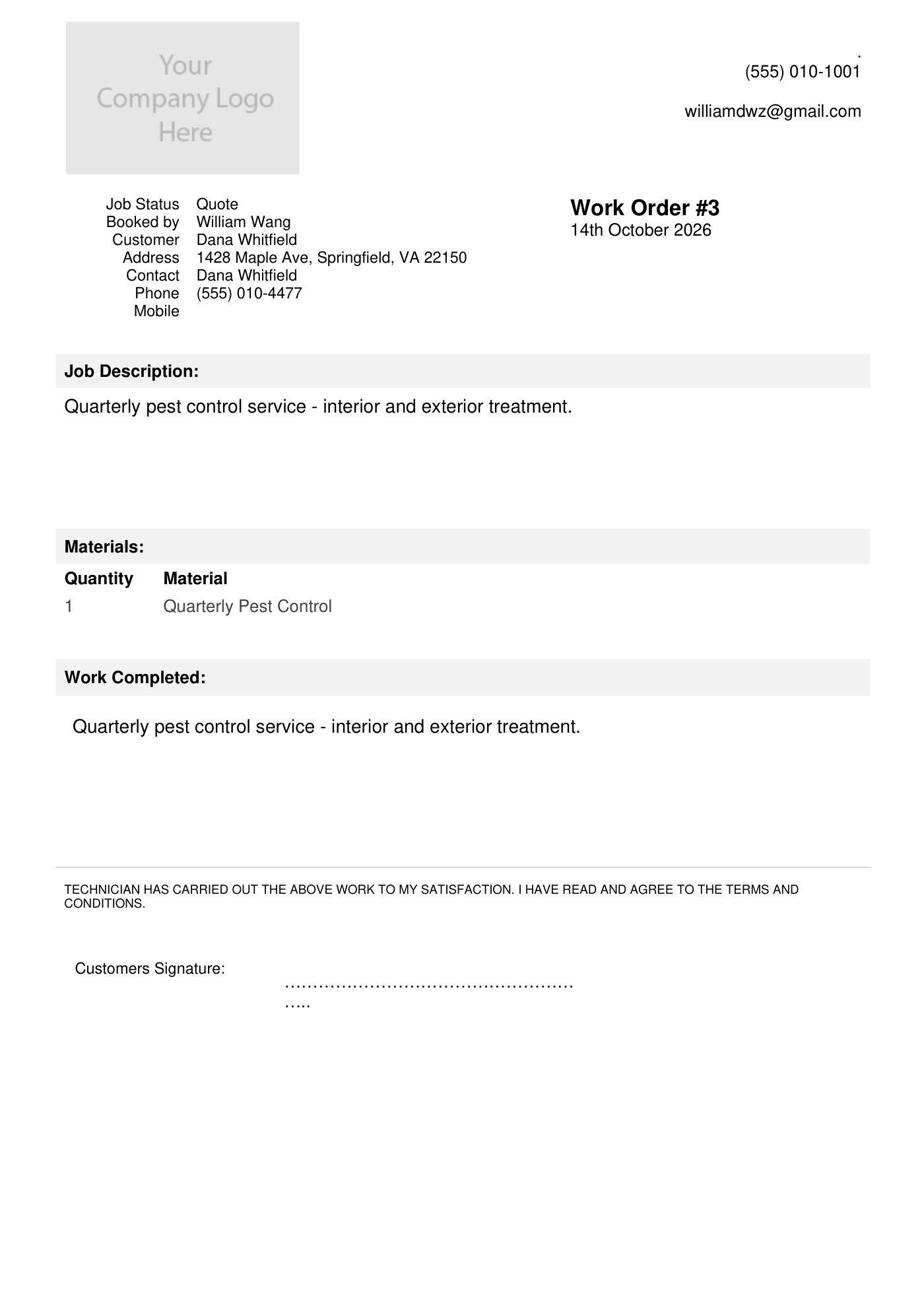
We printed all three customer documents from the same job and read every field on every page. None of them contains a chemical name, an EPA registration number, a dilution rate, an amount applied or a target pest. The Materials table on the Work Order lists only the service line item, with a quantity and a unit price. That is a billing row, not a record of what went down and where.
The checklist we built inside the job is the closest substitute, and it is a good builder: eight question types, a required-field switch, and an auto-attach option that puts the form on every new job. But the checklist does not print. We printed the same job with the checklist attached and the page came out the same shape as a job without one, so the answers a technician types stay inside ServiceM8 rather than reaching the customer or the inspector.
To get a document that carries chemical data you are buying a form from the Form Store, paying $89 to $129 for a pest control form, or building one in Microsoft Word and importing it. Both routes produce a PDF, and a PDF cannot be queried. The comparison across all three products is on the evidence page.
Quarterly recurring takes three steps and a paid add-on
The free Recurrence dropdown on a job card offers every week, two weeks, three weeks and four weeks. That is the whole list. It cannot express a quarter, and ServiceM8's own add-on description positions it for cleaning, pool and lawn work rather than pest control.
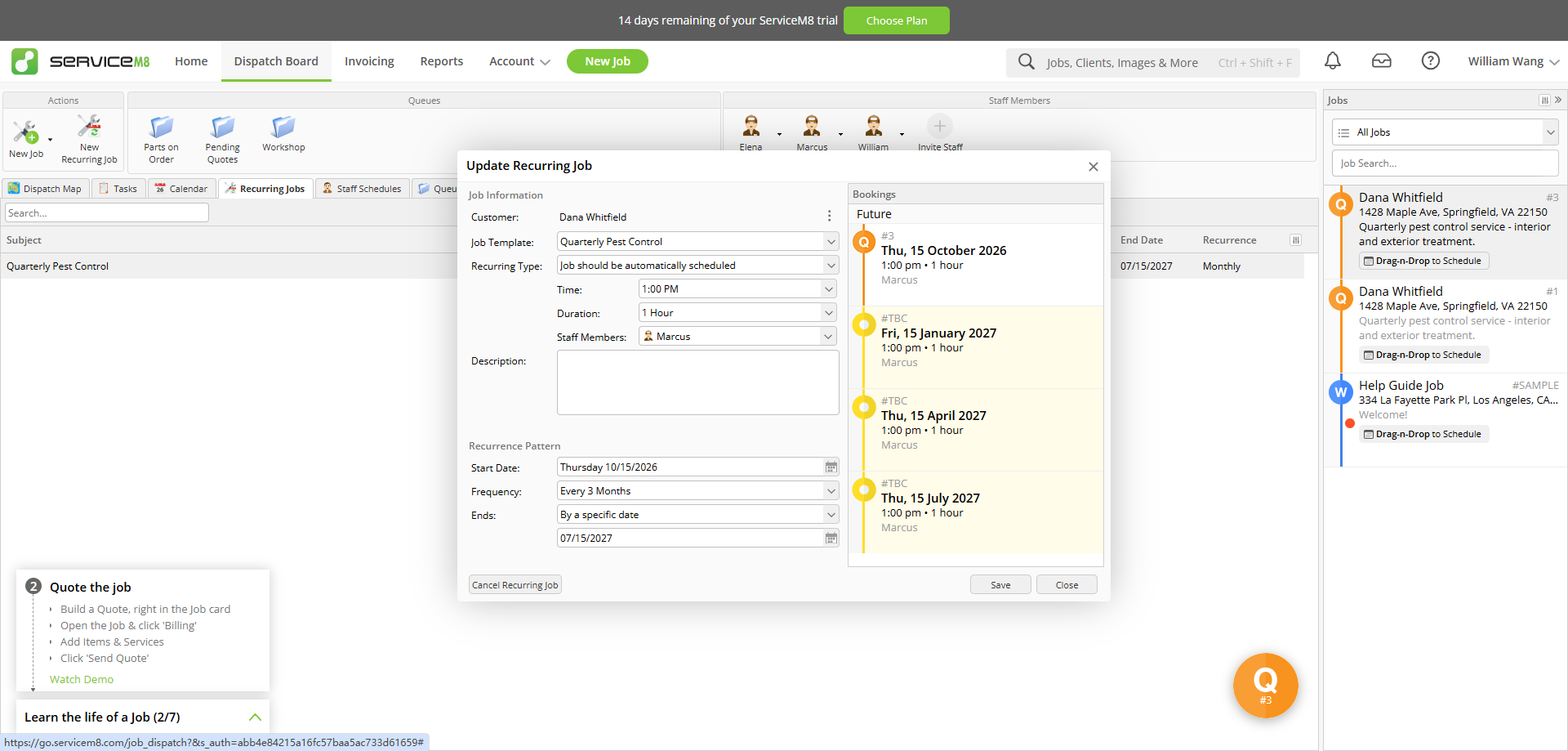
Reaching every three months means turning on the Recurring Jobs + Reminders add-on, building a job template first, and using the New Recurring Job flow on the dispatch board. Do that and the Frequency list does include Every 3 Months. Future bookings then appear as yellow TBC rows until they are activated, seven days before the visit by default.
The customer documents disagree with each other about dates
The Estimate printed 10/14/2026, month first. The Work Order and the Invoice from the same job both printed 14th October 2026, day first and with an ordinal. Three documents, two formats, one job. For a US customer the invoice date is the one most likely to be misread.
The Work Completed section arrives pre-filled
On a job where nobody had been to the property, the printed Work Order and Invoice both carried the template's description text under Work Completed. The customer's copy therefore states that the work was carried out before anyone has done it. We reported this to ServiceM8 and have not had a reply; if that changes, this paragraph gets a date and an update.
Forms cost extra, and the free tier was not offered
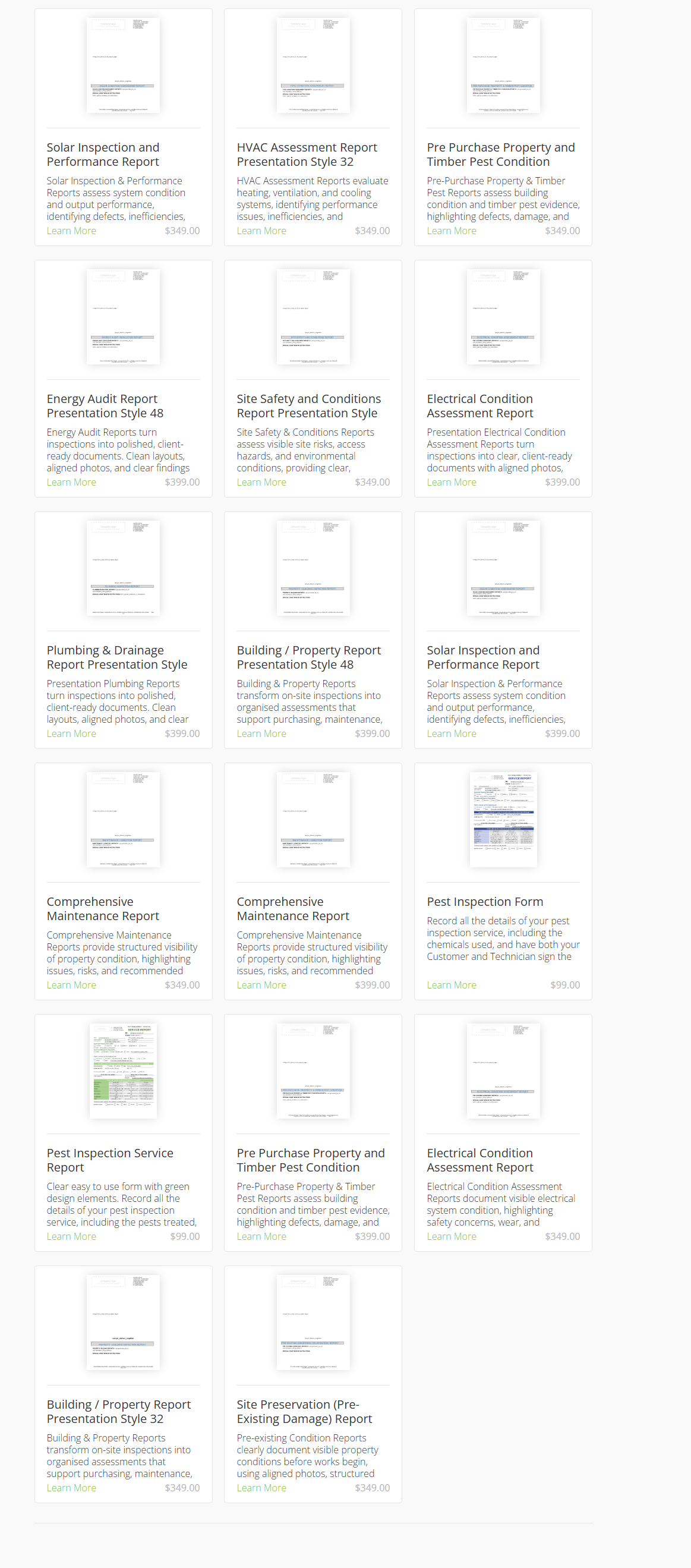
The Form Store's pest control category listed six forms at $89, $99 and $129 each, and the store states that forms carry a one-off charge. The pricing page also lists a $0 tier, which our account's Choose Plan screen did not offer. Neither is a defect; both are things to know before you budget $79 a month and assume that is the number.
What is already switched on when you sign in
Three add-ons were active in our new account before we touched anything: Track My Arrival, which lets customers see staff arriving in real time by SMS; Enhanced Job Card; and Smart Contacts, described in the add-on list as updating client contact details automatically from job data.
The third is the one worth a minute of thought. A correction typed on a job can overwrite the client record, and the owner is not told it happened. That is a defensible design choice for keeping a database clean, and it is also a way to lose a phone number that was right. If you run ServiceM8, decide deliberately whether you want it on.
What we could not test
We did not process a payment, connect a payment processor, install the mobile app, contact support, or test any of the AI features. We never bought a plan, so every price is a published price and not a bill. Our trial never named a tier, and ServiceM8's FAQ says a trial gives full feature access, so we cannot say from experience what changes when a trial converts. We did not exceed a job allowance and we never reached the $0 tier. Everything about the Form Store comes from browsing it, not buying from it. And we are not licensed pesticide applicators: nothing on this page is a statement about what your state will accept.
So should a pest control company use ServiceM8?
If your constraint is headcount and cash, ServiceM8 is the cheapest way to put a three-technician company on a real field service system, and the only one of the six whose bill does not rise when you hire. That advantage is large enough to be worth living with a workaround.
If your constraint is the paper that a state inspector asks for, or a quarterly contract that has to schedule itself without a three-step setup, the workaround is the product. In that case the honest comparison is against GorillaDesk, which prints the EPA number on the work order the customer signs, and against Jobber, which keeps a queryable chemical record but only from a desk. All three are set side by side on the hub page.
Frequently asked questions
Is ServiceM8 good for a small pest control company?
It is good at the parts a three-technician company does every day: scheduling, dispatch, quoting, invoicing, and a bill that does not rise when you hire because every paid tier carries unlimited users. It is weaker on the paperwork that is specific to pest control. There is no native pesticide application record, quarterly recurring routes need a paid add-on plus a job template, and the forms that would carry a treatment record cost $89 to $129 each or have to be built in Microsoft Word.
Does ServiceM8 have a pesticide application record?
No native one. We printed the Work Order, the Estimate and the Invoice from the same job and read every field: none contains a chemical name, an EPA registration number, a dilution rate, an amount applied or a target pest. A checklist built inside the job reminds a technician to record those things, but the checklist does not print on any of the three documents.
Can ServiceM8 do quarterly recurring pest service?
Yes, through a route that takes three steps. The free Recurrence dropdown on a job card stops at every four weeks, so it cannot express quarterly. Reaching every three months requires the Recurring Jobs + Reminders add-on, a job template built first, and the New Recurring Job flow on the dispatch board. Future bookings then appear as TBC until they are activated.
How much does ServiceM8 cost for 200 quarterly accounts?
About $79 a month on Growing, because 200 accounts on quarterly service is roughly 67 jobs a month and Growing allows 150. That is $948 a year before card processing and before any form you buy. The full tier ladder and what each tier unlocks is on our ServiceM8 pricing page.
What is switched on in ServiceM8 before you configure anything?
Three add-ons in our new account: Track My Arrival, which texts customers when staff are on the way; Enhanced Job Card; and Smart Contacts, which updates client contact details from job data. That last one is the one to look at, because a correction typed on a job can overwrite the client record.
If you want to try it yourself: the 14-day trial requires no credit card — we signed up without one and our account page showed no payment method on file. ServiceM8's pricing page is here and the signup page is here. We are not a ServiceM8 affiliate at the time of writing, so this page carries no affiliate link for ServiceM8 and going there pays us nothing.
Sources, and how to cite this page
Everything on this page was read from screens inside our own ServiceM8 14-day trial account on October 14-15, 2026, or from ServiceM8's public pricing page, FAQ and Form Store, accessed through that account. The company name, the client records, the staff names, the addresses, the phone numbers, the service items and the checklists in the account are fictional test data built to match a three-technician residential pest control company running quarterly contracts on roughly 200 accounts. The screenshots and the PDF exports are ours. Pricing and feature-tier statements were checked against servicem8.com/pricing on October 13 and 15, 2026. ServiceM8 has not seen this page and has not paid us.
Cite this page: Wang, William. "ServiceM8 review: what a 14-day trial showed, and what it did not." Pest Software Hub, October 28, 2026. https://pestsoftwarehub.com/servicem8-review
Corrections: if the ServiceM8 screens you see differ from the ones described here, tell us and we will check it and publish the fix with the date.
Related reading
- ServiceM8 pricing — five job-credit tiers and what each one unlocks
- ServiceM8 recurring jobs — the 4-week cap and the three-step route to quarterly
- Jobber chemical tracking — the record ServiceM8 does not have
- GorillaDesk pesticide record — the one that prints on the customer's work order
- How this compares with Jobber and GorillaDesk — one scripted route, three products